Work & Company
Recognize Phishing at Work
Jan 12, 2026
Build a Phishing Simulation Program That Drives Real Behavior Change
Learn how to design effective phishing simulation campaigns. A complete CISO guide covering metrics, NIST difficulty scaling, and ethical best practices.

This guide walks through designing a phishing simulation program grounded in evidence from NIST, ENISA, UK NCSC, and peer-reviewed field studies. You'll learn the metrics that predict real-world resilience, how to design an ethical baseline that builds trust, and practical steps to launch in six weeks.
Choose Your North Star Metric
Security teams obsess over click rates. "We got our phishing-prone percentage down to 12%!" But does that number actually reduce breach risk?
Research suggests report rate matters more. When employees quickly identify and report suspicious emails, your security operations center can respond within minutes instead of hours or days. That speed shrinks attacker dwell time and prevents lateral movement.
The four metrics that predict resilience:
Report rate measures the percentage of targeted users who report simulations through your approved channel. Organizations with 60% report rates detect real threats 10 times faster than those with 7% rates. This metric shows employees trust your reporting process and know how to use it.
Time-to-report tracks minutes from email delivery to the first verified report. Faster detection means less time for attackers to move laterally. Mature programs achieve median times under 15 minutes.
Unsafe action rate captures clicks, credential submissions, or acting on fraudulent requests. Track this alongside difficulty ratings (more on that shortly) to understand whether improvement comes from better training or easier templates.
Repeat offender rate identifies employees who fail multiple simulations in a quarter. This becomes your coaching priority list, not a punishment scoreboard. Most people improve rapidly after initial mistakes.
Pick one primary objective:
Behavioral resilience if you want employees to detect and report threats faster
Risk reduction if you need board-ready metrics showing decreased breach probability
Culture transformation if security awareness needs a complete reset
Regulatory compliance if NIS2, ISO 27001, or FFIEC requirements drive your timeline
Most organizations should prioritize behavioral resilience. This objective delivers risk reduction and culture benefits while creating audit-ready documentation.
Assemble Your Steering Committee in One Week
Security can't design this program alone. Phishing simulations touch HR policy, legal compliance, internal communications, and operational workflows. Without cross-functional alignment, you'll face complaints, confusion, and potential backlash.
Your steering committee needs five roles:
CISO or Security Leader serves as executive sponsor. This person sets program tone, shields the initiative from political pushback, and ensures everyone participates (including C-suite). Executive participation sends a powerful message about organizational commitment.
HR shapes communication tone and handles employee concerns. When someone feels tricked by a simulation, HR prevents that frustration from becoming a formal complaint or union issue. HR also ensures your "no discipline for simulation failures" policy stays enforced.
Legal or Compliance reviews data privacy, consent requirements, and ethics guardrails. GDPR, Singapore's PDPA, and worker monitoring regulations vary by jurisdiction. Legal ensures you stay compliant while still running effective simulations.
IT and SOC implement technical infrastructure and close the reporting loop. They configure email add-ins, integrate with security tools, and respond when employees report suspicious emails (real or simulated).
Internal Communications drafts pre-launch messaging, manager briefings, and celebration content. They control the narrative and prevent simulations from feeling like gotcha exercises.
First meeting agenda:
Schedule 90 minutes and cover these items:
Present your primary objective and 12-month timeline
Draft an ethics charter defining off-limits topics and individual data protections
Agree on scenarios that are realistic but not emotionally manipulative
Define data handling, retention policies, and who sees individual results
Set bi-weekly check-ins during setup, monthly updates after launch
Sample ethics charter language:
"Our phishing simulation program builds a human sensor network that detects threats faster. We commit to teaching rather than tricking. Individual results remain confidential. Simulation failures don't affect performance reviews. Scenarios mirror real threats but avoid manipulative themes like layoffs, health scares, or financial bonuses. Employees who report threats become recognized security champions."
This charter prevents the trust damage that comes from surprise, punitive approaches. Research shows transparent programs achieve higher report rates and fewer complaints than "gotcha" initiatives.
Rethink the Baseline Test
Many vendors recommend sending one unannounced phishing email to establish a baseline click rate. "Your phishing-prone percentage is 28%!" This single number becomes the reference point for all future campaigns.
This approach has serious methodological problems.
A single baseline test primarily measures scenario difficulty, novelty effects, and contextual factors—not stable employee competence. Hard templates produce higher click rates than easy ones (obviously). First-time simulations benefit from surprise. Busy periods, holidays, and concurrent incidents all skew results.
A large reproduction study using the NIST Phish Scale found that template difficulty explains far more variance in results than training effects. When researchers controlled for difficulty, standard training programs showed no practically significant impact on click or report rates.
Use a baseline period, not a baseline test.
Design three campaigns spread over six to eight weeks. Each targets a different attack vector at a different difficulty level. This approach gives you a reference range rather than a single potentially misleading number.
Campaign 1 runs in week three and tests an IT or help desk notification (password reset, system update). Rate this easy to moderate difficulty. This campaign establishes your floor and tests whether your reporting mechanism works.
Campaign 2 runs in week five with a delivery or shipping notification (package tracking, failed delivery). Use moderate difficulty. This tests a different psychological trigger and measures consistency.
Campaign 3 runs in week seven targeting internal HR or Finance scenarios (benefits update, expense submission). Rate this moderate to hard. This tests trust in internal sources and completes your baseline band.
Tag every template with a NIST Phish Scale difficulty rating. Without these ratings, you can't tell if improved results mean better training or easier templates. Boards need normalized trends that account for difficulty variation.
Your baseline metrics should look like this:
Unsafe action rate: 28% (easy) to 42% (hard) depending on difficulty
Report rate: 12% to 18% across campaigns
Time-to-report: 48 to 65 minutes median
These bands become your reference. Track improvement against comparable difficulty levels over time.
Communicate Before You Launch
Transparency prevents backlash. Announce the program before or immediately after your first baseline campaign. Explain the purpose, reporting mechanism, and ethics commitments.
Program announcement email template:
"We're launching a phishing awareness program to build our collective security skills. You'll receive occasional simulated phishing emails designed to mimic real threats. These simulations help us practice detection and reporting in a safe environment.
What to expect: Simulations look realistic but contain subtle red flags. If something feels suspicious, use the Report Phishing button in your email toolbar. You'll receive immediate feedback explaining what to look for next time.
Our commitments: Individual results stay confidential. We don't discipline anyone for simulation clicks. Scenarios mirror real threats but avoid emotionally manipulative themes. Employees who actively report suspicious emails (real or simulated) become recognized security champions.
Why this matters: Fast detection and reporting reduce attacker dwell time from days to minutes. Your awareness is our strongest defense.
Executive participation: [CEO/CISO name] participates in all simulations alongside everyone else.
Questions? Contact [security-awareness@yourorg.com]"
This communication establishes psychological safety. Employees understand the purpose, know how to respond, and see leadership commitment. Research shows transparent programs achieve higher report rates than surprise approaches.
Build Landing Pages That Teach
What happens after someone clicks a simulated phishing link? This moment determines whether your program builds skills or damages trust.
For employees who clicked (unsafe action):
Create a landing page that loads in 60 to 90 seconds. Explain which red flags were present, demonstrate the safe behavior, and provide immediate next steps.
"This was a simulated phishing email.
Why this was suspicious:
Sender address used 'delivery-tracking[.]net' instead of a legitimate carrier domain
Generic greeting ('Dear Customer') rather than your name
Urgent language pressuring immediate action ('Package will be returned within 24 hours')
What to do next time:
Hover over links before clicking to check the real destination
Verify sender domains match official sources
When uncertain, use the Report Phishing button
You're now trained on this tactic. The same awareness that helped you learn here will protect you against real attacks."
Keep explanations concrete and visual. Show screenshots with arrows pointing to suspicious elements. Avoid security jargon.
Research shows 30 to 90 seconds of contextual feedback works. Longer embedded training pages get ignored. Employees under time pressure skim or skip lengthy content entirely.
For employees who reported (correct behavior):
Create a success page with immediate positive reinforcement.
"You did the right thing!
This was a simulated phishing email, and you correctly identified and reported it.
Your quick reporting is exactly what we need. In a real attack, your action helps our security team respond within minutes instead of hours.
Keep up the excellent work. You're a phishing hunter."
Positive reinforcement drives sustained reporting behavior. Organizations that celebrate reporters achieve 8x better long-term outcomes than those fixating on clickers.
Launch and Capture the Right Data
Your T-24 hour checklist:
Brief your helpdesk on what to expect and provide FAQ responses. Send manager one-pagers with timeline and talking points. Seed test your simulation to five to 10 addresses and verify links, landing pages, and the reporting button all function correctly. Confirm your SOC is ready to handle reports. Define pause criteria (real phishing incident, major IT outage, crisis event).
Launch day monitoring (first 48 hours):
Watch for 10 or more reports in the first two hours. This indicates your reporting mechanism works and people understand how to use it. Track time-to-first-report. Monitor helpdesk tickets for confusion or concerns. Be ready to pause if necessary.
Data to capture per campaign:
Document delivery count, unique opens, users who clicked links, users who entered credentials, and total unsafe action rate. Track users who reported, median time-to-report, and users who reported before clicking. Break down results by cohort (Finance, IT, Executives, General employees). Note which employees failed multiple campaigns for coaching purposes.
Compare simulation results with real phishing incidents reported during the same period. This correlation helps validate whether your program predicts real-world behavior.
Analyze your baseline band:
Calculate reference ranges across all three campaigns rather than treating any single number as definitive. Your baseline might show unsafe actions ranging from 28% to 42% depending on difficulty, report rates from 12% to 18%, and time-to-report from 48 to 65 minutes.
Good baseline results include:
Report rate anywhere from 10% to 25% (you'll grow this over time)
Time-to-report under 90 minutes median
Unsafe actions between 20% and 45% (difficulty-dependent)
No major complaints or ethics violations
Red flags requiring immediate attention:
Report rate below 5% (reporting mechanism not working or poorly communicated)
Multiple formal complaints to HR (communication or template ethics issue)
One department performing 3x worse than others (may indicate local culture problem or actual attack history creating hypervigilance)
Map Scenarios to Real Risks
Generic phishing templates waste training opportunities. Different roles face different threats. Effective programs target realistic scenarios aligned to actual job risks.
Finance, Accounting, and Payroll teams encounter invoice fraud, fake vendor communications, payment diversion requests, W-2 or payroll redirect attempts, wire transfer authorization requests, and executive approval impersonation (business email compromise).
IT and System Administrators see credential harvesting (fake SSO, VPN, or admin portals), security alerts requiring password confirmation, software update notifications with malicious payloads, and supplier portal access requests.
Customer-facing roles (sales, support, account managers) deal with customer impersonation requesting data, fake customer complaints with malicious links, service escalation requests, and OAuth consent phishing.
HR and Recruiting teams receive fake job applications with malicious resumes, candidate background check requests, benefits provider impersonation, and employee data requests.
Executives and VIPs face board meeting document requests, M&A confidential information requests, executive assistant impersonation, and deepfake voice calls (for advanced programs only).
All employees encounter generic delivery notifications, IT helpdesk password resets, company announcement links, gift card or rewards phishing, and QR code phishing.
Consult your incident logs and security operations center data. Which attack types actually hit your organization? Start there rather than with vendor template libraries.
Set Your Cadence: Monthly Minimum
Research comparing quarterly training to continuous programs found dramatic differences. Organizations running simulations only every three months achieved 7% report rates. Organizations running monthly or more frequent simulations reached 60% report rates within 12 months.
Frequency beats content quality. Repeated exposure with immediate feedback builds habits. Annual or quarterly big-bang training provides minimal behavioral change.
Sample 12-month calendar:
Month 1-2 covers your baseline period (three campaigns). Month 3 targets Finance with invoice fraud scenarios at moderate difficulty. Month 4 hits IT with credential harvesting plus general employees with package notifications. Month 5 focuses on customer-facing teams with OAuth abuse scenarios. Month 6 tests executives with business email compromise and adds QR code simulations for everyone.
Month 7 returns to Finance with harder payment diversion scenarios and includes targeted coaching for repeat offenders using easier templates. Month 8 runs organization-wide moderate difficulty IT notifications. Month 9 challenges IT with hard fake security alerts and pilots SMS phishing for high-risk cohorts. Month 10 revisits customer-facing with impersonation scenarios. Month 11 introduces deepfake voice simulations for Finance and Executive teams. Month 12 runs a year-end assessment mixing difficulty levels across all cohorts.
Randomize delivery timing within each campaign. Vary day of week, time of day, and sender personas. Stagger delivery so not everyone receives the email simultaneously. This prevents Slack or Teams channels from sharing warnings.
Adapt Difficulty Based on Performance
One size doesn't fit all. Use NIST Phish Scale ratings to progress employees appropriately.
For high performers (low unsafe actions, high reporting): Increase difficulty by moving to hard templates faster. Reduce frequency slightly to every six weeks instead of monthly. Add advanced scenarios like deepfakes or multi-stage attacks.
For struggling cohorts (high repeat offenders): Temporarily reduce difficulty by returning to easy templates. Increase coaching touchpoints with one-on-one sessions or small group workshops. Gamify recovery by celebrating three-campaign improvement streaks. Investigate root causes—some jobs legitimately face more email complexity than others.
Never do these things:
Publicly shame repeat offenders
Tie simulation performance to compensation or promotion decisions
Require lengthy mandatory training as punishment
Name individuals in executive reports
Always do these things:
Celebrate "most improved" cohorts quarterly
Offer optional micro-learning libraries (two to five minute modules on demand)
Send supportive manager notes: "Your team's reporting rate is growing—ways you can support them further"
Recognize employees who report real threats through the same channel
Most people improve rapidly after initial mistakes. Longitudinal research found 70% of employees who failed once didn't repeat after receiving feedback. Repeat offenders typically represent 5% to 15% of your population at most.
Translate Metrics Into Risk Reduction
Security teams live in operational dashboards. Boards need financial impact narratives. Bridge this gap with cyber risk quantification.
Monthly dashboard for your security team:
Track headline numbers: report rate with percentage change from baseline, median time-to-report with improvement delta, unsafe action rate on moderate difficulty templates with trajectory toward target. Document this month's campaigns with difficulty ratings, report rates, and unsafe action percentages. Show cohort performance identifying top reporters and teams needing attention. List repeat offenders with enrollment status in coaching programs. Correlate with real incidents by tracking user-reported real phishing and confirmed threats blocked quickly.
Quarterly board report:
Calculate Annual Loss Expectancy (ALE) for key attack scenarios. For business email compromise, estimate pre-program probability using industry data and internal incidents (example: 10% probability). Multiply by average loss from successful BEC attacks (FBI data shows approximately $1.4 million average). Your baseline ALE might be $140,000.
After nine months of training, your Finance cohort achieves 48% report rates and 24-minute median detection time. This substantially reduces BEC probability. Adjust your estimate to 2% probability. Your new ALE drops to $28,000.
Present this as: "Our phishing simulation program reduced modeled BEC risk by approximately $112,000 annually through improved detection speed and reporting behavior."
Calculate similar metrics for credential compromise leading to lateral movement. Use industry breach cost data (IBM reports average breach costs around $5 to 6 million) and adjust probabilities based on your improved metrics.
Show program investment (platform, operations, staff time) compared to modeled risk reduction. A 7-to-1 return or higher justifies continued investment and expansion.
Include culture indicators like employee survey approval ratings, zero ethics complaints, executive participation rates, and voluntary engagement with optional training. Add compliance status confirming you meet NIS2, ISO 27001, or relevant regulatory requirements with comprehensive documentation.
Avoid These Mistakes
The one-time baseline trap misleads organizations into thinking a single campaign represents stable employee competence. Reality: that number mostly reflects template difficulty and novelty effects. Use multi-campaign baseline periods with difficulty ratings instead.
Click rate as your primary KPI creates perverse incentives. Employees learn to delete everything suspicious, losing legitimate emails in the process. Some organizations see decreased reporting because people fear being labeled failures. Prioritize report rate and time-to-report metrics instead.
Long embedded training pages get ignored. Research tracking user behavior found most people spend minimal time on lengthy landing pages. They skim or skip entirely under time pressure. Keep feedback to 30 to 90 seconds. Offer optional deep-dives for interested learners.
Gotcha culture and surprise tests damage trust. UK NCSC, ENISA, and CREST research all warn against surprise punitive simulations. Employees feel tricked. Complaints rise. Union issues emerge. Legal challenges happen. Communicate program purpose transparently before launch.
Ignoring difficulty when reporting results leads boards to misinterpret data. "Our click rate went from 15% to 22%—we got worse!" Maybe. Or maybe your templates got harder to reflect evolving real-world threats. Without NIST Phish Scale ratings, nobody knows which interpretation is correct.
What Success Looks Like at 12 Months
Behavioral metrics:
Report rate above 60% (up from 7% to 15% baseline)
Time-to-report under 15 minutes median (down from 60+ minutes)
Unsafe actions below 8% on moderate difficulty (down from 30% to 35%)
Repeat offenders under 10% (down from 15% to 20%)
Cultural indicators:
Zero formal ethics complaints filed
Above 85% employee approval in surveys
Voluntary participation in optional training modules
Active security champions network across departments
Business impact:
Real threat user-reports increased 3x to 5x from baseline
Incident detection time under one hour for user-reported threats (previously days or weeks)
Modeled Annual Loss Expectancy reduction of 40% to 60% for human-factor risks
Audit readiness with comprehensive documentation for regulatory requirements
Board recognition:
CISO presents quarterly with risk-quantified metrics
Security awareness included in enterprise risk register
Budget approved for program expansion (multi-channel, third-party training)
Your Six-Week Launch Plan
Week 1: Assemble your steering committee with CISO, HR, Legal, IT/SOC, and Communications. Draft your ethics charter. Define off-limits scenarios and data handling policies. Schedule bi-weekly check-ins.
Week 2: Select your simulation platform. Define your four core metrics with target trajectories. Design three baseline campaigns with NIST Phish Scale difficulty ratings. Build landing page templates for click and report experiences.
Weeks 3-4: Brief helpdesk and managers with FAQ documents and talking points. Draft your program announcement email with ethics commitments and executive endorsement. Configure reporting buttons and SOC integration. Seed test all technical workflows.
Week 5: Launch Campaign 1. Monitor reporting mechanism, time-to-first-report, and helpdesk tickets. Celebrate early reporters publicly.
Week 6: Launch Campaigns 2 and 3. Capture data from all three baseline campaigns. Calculate your baseline bands for unsafe actions, report rates, and time-to-report. Analyze cohort breakdowns and identify priority areas.
Week 7 and beyond: Enter continuous monthly cadence. Adapt scenarios to role-based risks. Progress difficulty based on performance. Report monthly to security team, quarterly to board.
This timeline takes you from planning to mature baseline in six weeks. Most organizations achieve measurable improvement within three months and reach target metrics within 12 months.
Research shows the difference between programs that fail and programs that transform security culture isn't budget or technology. It's design. Measure behavioral metrics instead of just clicks. Build multi-campaign baselines instead of single tests. Communicate transparently instead of surprising people. Track difficulty alongside results instead of treating all campaigns as equivalent.
These principles turn phishing simulations from compliance theater into genuine risk reduction.
About Brightside
Brightside AI is a comprehensive security awareness platform that combines OSINT-powered technology, interactive training, and advanced attack simulations to protect organizations from evolving cyber threats.
Digital Footprint Scanning
The platform maps employee digital presence across six categories: personal information, data leaks, online services, personal interests, social connections, and locations. This OSINT scanning identifies vulnerable data points that attackers could exploit, providing visibility into workforce exposure before threats materialize.
Interactive Training
Brightside delivers cybersecurity education through chat-based courses featuring Brighty, a privacy companion. The gamified learning experience includes mini-games, challenges, and achievement badges covering topics from phishing recognition to deepfake identification, ransomware awareness, and social engineering tactics.
Advanced Attack Simulations
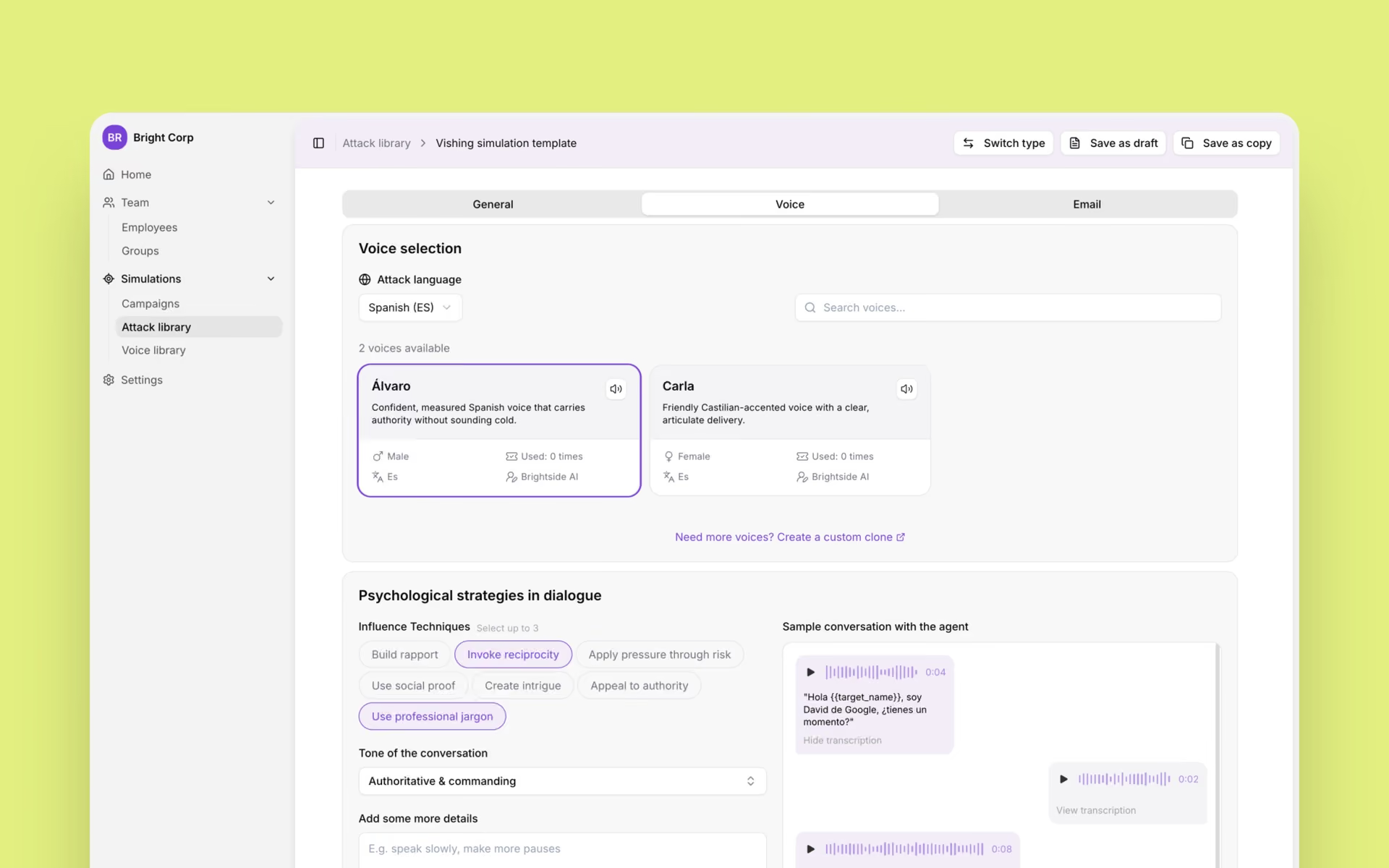
Organizations can deploy realistic phishing, vishing, and deepfake simulations tailored to employee risk profiles. The platform offers pre-made templates and AI-generated spear phishing scenarios using real OSINT data, training teams against email, voice, and video-based attacks.
Data Broker Removal
Brightside identifies which data brokers hold employee information and automates removal requests, proactively reducing the intelligence available to attackers.
Personal Data & Privacy
Both
How-To Guide
Control My Online Visibility
Stop Doxxing

Social Media Security Checklist: Protect Your Privacy Now
Personal Data & Privacy
,
Control My Online Visibility
Jan 13, 2026
Work & Company
Work Security
How-To Guide
Recognize Phishing at Work
Stay Compliant

Build a Phishing Simulation Program That Drives Real Behavior Change
Work & Company
,
Recognize Phishing at Work
Jan 12, 2026
Personal Data & Privacy
Personal Privacy
Checklist
Secure My Data & Devices
Prevent Data Breaches

Smart Home Security Checklist: How To Stay Safe Without Giving Up All Your Data
Personal Data & Privacy
,
Secure My Data & Devices
Jan 10, 2026
Device & Browser Security
Personal Privacy
Article
Secure My Data & Devices
Avoid Getting Hacked

Are Browser Extensions Spying on You? Safety Guide
Device & Browser Security
,
Secure My Data & Devices
Jan 9, 2026