Back to blog
What Can Hackers Find About You in 5 Minutes? Your Digital Footprint Exposed

Written by
Brightside Team
Published on
Go ahead, Google yourself right now. I'll wait.
What did you find? Your LinkedIn profile? Maybe some old social media posts? A professional directory listing? That's just the surface. What you're seeing is the same information that attackers see when they start researching you. Except they know exactly where else to look.
Here's the unsettling reality: a recent survey found that 60% of internet users have something in their digital footprint they don't want others to find. Most people have no idea how much personal information is publicly accessible about them. And attackers who do know can assemble a surprisingly complete profile of you in less time than it takes to drink your morning coffee.
This isn't about paranoia. It's about understanding the trail of data you create every time you click, post, shop, or sign up for something online. Your digital footprint is the complete record of your online presence. It includes things you deliberately share, like Facebook posts and LinkedIn updates. But it also includes information collected about you without your direct action, like your browsing habits, location history, and purchase patterns.
Why does this matter? Because every piece of information in your digital footprint is ammunition for attackers. The voice samples from that conference presentation you gave? Perfect for creating deepfake audio. Your LinkedIn connections showing you report to the CFO? Great targeting data for a phishing attack. The family photos with location tags showing where you vacation? Useful for knowing when you're vulnerable.
This guide will show you exactly what attackers can find about you in just five minutes using completely free tools. You'll see real reconnaissance techniques, understand what information is most dangerous when exposed, and learn specific steps to reduce your digital footprint before someone weaponizes it against you.
What Is Your Digital Footprint and Why Does It Matter?
Every time you interact with the internet, you leave traces. Some are obvious. When you post on Instagram or update your LinkedIn profile, you're actively creating your digital footprint. Other traces form passively as websites track your visits, browsers record your searches, and apps monitor your location.
Data brokers make this situation worse. These companies collect information from thousands of sources, creating comprehensive profiles they sell to anyone willing to pay. Your name, address, phone numbers, family relationships, property ownership, and shopping habits get packaged into databases that anyone can access.
Think about what this means for security. Traditional security questions ask for your mother's maiden name, your first pet's name, or the city where you were born. How many of those answers are in your Facebook posts from years ago? Attackers don't need to guess. They just need to search.
The Hong Kong deepfake fraud that cost a company $25 million started with exactly this type of reconnaissance. Attackers gathered voice samples from public recordings, studied organizational charts visible on LinkedIn, and analyzed communication patterns from social media. Every piece of that information was publicly available. The attack succeeded because the targets didn't realize how much was exposed.
For businesses, the risk multiplies across every employee. When your CFO's authority levels are visible on LinkedIn, attackers know exactly who to target for wire transfer fraud. When your CEO has hours of conference presentations online, those become source material for voice cloning. When employees post about work projects on social media, competitive intelligence gets leaked without anyone noticing.
This is why "I have nothing to hide" misses the point entirely. You're not hiding. You're controlling your own information instead of letting it be weaponized against you.
What Personal Information Can Hackers Find in 5 Minutes?
Let's walk through what an attacker actually finds when they research you. These aren't theoretical examples. These are real techniques using tools anyone can access.
Category 1: Contact Information and Basic Details
Start with just your name and city. Within two minutes, free people search engines will show your current address, previous addresses going back years, phone numbers including ones you might have forgotten about, email addresses associated with your name, and often your age and family member names.
Why does this matter? Your email address is the key to password resets on most accounts. Your phone number enables SIM-swapping attacks where someone takes over your phone number to intercept security codes. Your address facilitates identity theft and can be used for phishing that references your actual location.
Category 2: Social Connections and Relationships
Social media platforms make relationship mapping trivial. LinkedIn shows exactly who you work with, who you report to, and what your professional network looks like. Facebook reveals family connections, close friends, and social groups. Instagram shows who you spend time with and what activities you share.
Attackers use this information to impersonate people you trust. If they can see you're connected to someone named Sarah in marketing, they can email you pretending to be Sarah. The email will reference your actual connection, making it far more convincing than a generic phishing attempt. This technique succeeds because the personalization feels legitimate.
Category 3: Professional and Career Information
Your LinkedIn profile is a treasure trove for attackers. It shows your employment history, current responsibilities, and professional certifications. It often indicates your authority level and what you have permission to approve. Company websites might list you as a key contact or decision maker.
This information tells attackers exactly how to target you. Finance staff become wire transfer fraud targets. HR personnel get approached with fake recruitment schemes. IT teams receive requests for system access that seem legitimate because the attacker knows their actual responsibilities.
Conference presentations create additional exposure. Every recording where you speak publicly provides voice samples that can be used for deepfake attacks. Written presentations reveal communication style that attackers can mimic in phishing emails.
Category 4: Personal Interests and Daily Habits
Social media posts reveal far more than you probably realize. Photos with location tags show where you go regularly. Check-ins at restaurants and events create a pattern of your routines. Posts about hobbies and interests build a personality profile. Travel photos announce when you're away from home.
Attackers use these details to build rapport and trust. They'll reference your hobbies in conversation to seem familiar. They'll time attacks for when they know you're likely distracted or away. They'll craft phishing scenarios around your interests because you're more likely to engage with topics you care about.
Category 5: Financial and Shopping Patterns
While your credit card numbers aren't publicly visible, attackers can still gather significant financial intelligence. Social media posts about purchases reveal what brands you use and where you shop. E-commerce accounts show up in data breaches. Reviews and ratings on shopping sites link your name to specific products and services.
This creates targeting opportunities for fraud. If attackers know you bank with a specific institution, they can craft phishing emails that perfectly mimic that bank's communications. If they see you frequently shop at particular retailers, fake purchase confirmations from those stores will seem credible.
Category 6: Data Breaches and Compromised Information
The average person appears in four to six data breaches. These breaches expose email addresses, passwords (often hashed but sometimes in plain text), security question answers, phone numbers, and sometimes financial details.
Services like Have I Been Pwned let anyone check which breaches contain your information. Attackers use this data for credential stuffing, trying your compromised passwords across multiple accounts. They also use breached information to answer security questions and reset passwords on accounts where you reused credentials.
The combination of all these categories creates comprehensive profiles. Individually, each piece of information might seem harmless. Your favorite restaurant, your mother's maiden name visible in a family tree, the project you mentioned on LinkedIn. Together, they enable sophisticated, personalized attacks that are extremely difficult to detect.
How Do Hackers Actually Use This Information?
Understanding what's exposed is one thing. Understanding how it gets weaponized is another. Let's break down the actual attack process.
Attackers start with basic identification. They find your name, location, email, and social media profiles. This takes about one minute using search engines and people search sites. They immediately know where you live, where you work, and how to contact you.
Next comes relationship mapping. Another two minutes on LinkedIn and Facebook reveals your professional network, family connections, and social circles. Attackers now know who might legitimately contact you, who you'd trust, and what communication would seem normal.
Pattern analysis follows. By scanning your social media posts, they identify your interests, communication style, and daily routines. They note what times you're active online, what topics engage you, and what language patterns you use. This phase takes about three minutes but yields information that makes phishing attempts dramatically more convincing.
The final step is vulnerability identification. What security questions could they answer from your posts? What passwords might you use based on breached credentials and personal information? Who could they impersonate who you wouldn't question? What requests would you approve without additional verification?
The entire reconnaissance process takes less time than most people spend choosing what to watch on Netflix. Yet it provides everything needed to craft a targeted attack that has a 30-50% success rate compared to just 3-5% for generic phishing.
How Can You Check Your Own Digital Footprint?
You need to see what attackers see. Start with basic Google searches of your full name in quotes. Try combining your name with your city, phone number, email address, company name, and common usernames. Each combination reveals different aspects of your digital presence.
Search major people search engines. Sites like Spokeo, WhitePages, and others aggregate data from public records and other sources. You'll likely be surprised by how much information appears, including details you don't remember sharing.
Check your social media visibility. Log out of your accounts and search for yourself. What can people see without being your friend or follower? Many people have their profiles set to public without realizing it. Photos, posts, friend lists, and personal details might all be accessible to anyone.
Run your email addresses through Have I Been Pwned. This shows which data breaches have exposed your information. You might discover breaches you never knew about affecting services you forgot you used.
Look at your professional presence. What appears on LinkedIn, company websites, professional directories, and industry publications? What does your professional footprint reveal about your authority, responsibilities, and access to sensitive systems?
Here's what indicates high exposure: If Google's first page shows your personal details, multiple old email addresses appear in searches, previous addresses are easily findable, phone numbers link to your name across multiple sites, family member information is readily available, or your professional authority is public, you have significant exposure that needs reduction.
What Can You Do to Reduce Your Digital Footprint?
Understanding your exposure is step one. Reduction is step two. This requires systematic effort, but the protection is worth it.
Start with social media privacy settings. Set all profiles to private or friends-only. Disable location tagging and services. Control who can tag you in photos and require approval before tagged content appears. Review past posts and delete anything that reveals security question answers, patterns attackers could exploit, or personal information you don't want public.
Data broker removal is more challenging but critical. The manual process involves identifying major data brokers, finding their opt-out procedures, submitting removal requests with required verification, and monitoring for re-aggregation. There are over 100 major data brokers, each with different removal processes. Manual removal takes 10-20 hours and requires quarterly repetition because data re-aggregates.
Automated removal services handle this process for you. They identify which brokers have your information and submit removal requests on your behalf. While these cost money, they save enormous time and provide ongoing monitoring that catches new exposure.
Change your online habits going forward. Before posting anything, ask whether this information could be used against you in any context. Will this still be acceptable in ten years? Could this help someone impersonate you? Does your employer need to see this?
Compartmentalize your digital identity. Use separate email addresses for different purposes. Keep professional and personal social media completely separate. Avoid linking accounts across platforms. This limits how much an attacker can discover from any single starting point.
Delete old unused accounts. That forum you joined in 2010? That shopping site you used once? Close them. Every abandoned account is an exposure point, especially if it gets breached and you reused passwords.
How Does Digital Footprint Reduction Protect Organizations?
Individual privacy matters, but organizational security depends on collective footprint management. When executives and employees have extensive digital exposure, the entire company becomes vulnerable.
Think about your CFO. If their LinkedIn profile shows they have wire transfer authority, their voice is available in earnings calls and presentations, and their communication style is visible in public posts, they're a perfect target for deepfake fraud. Attackers can clone their voice, understand their authority, and craft convincing scenarios because everything needed is publicly available.
The same logic applies across the organization. HR staff with visible hiring authority get targeted with recruitment fraud. IT personnel with public credentials become social engineering targets. Any employee whose role and relationships are visible can be impersonated or manipulated.
Organizations struggle with the scale of this problem. Manually checking what's publicly available about dozens or hundreds of employees is impractical. You need to know who is most exposed, what specific information is vulnerable, and how to prioritize remediation efforts.
Platforms like Brightside AI solve this through automated OSINT scanning that maps employee digital footprints across six key categories: personal information (emails, phones, addresses), data leaks (breached passwords, compromised credentials), online services (professional platforms, shopping accounts), personal interests (hobbies, forums, communities), social connections (relationships, interaction patterns), and locations (geographic data, address history). Employees access their own portal where they see their personal risk score, a dynamic assessment calculated based on the number and types of data points exposed, the relevance to their selected safety goals, attack surface combinations, and their goal-specific probability of becoming a victim. Brighty, the platform's privacy companion, then walks them through personalized action plans to secure their exposed data with step-by-step instructions delivered in simple, accessible language through a chat-based interface. This gives employees direct control over their digital privacy while helping them understand what information attackers could exploit and how to protect themselves.
This proactive approach prevents attacks by eliminating the information attackers need. When employees' digital footprints are minimized, attackers lack the personal details, relationship information, and behavioral patterns that make phishing, voice attacks, and deepfake attempts effective.
The return on investment is straightforward. The average business email compromise attack costs between $150,000 and $500,000. Data breaches average $4.88 million. Digital footprint assessment and reduction programs cost $10,000 to $50,000 annually. One prevented attack pays for years of protection.
Beyond financial protection, footprint reduction provides regulatory compliance support, protects competitive intelligence, maintains customer trust, and respects employee privacy while reducing corporate risk. Employees appreciate organizations that help them secure their personal information rather than just monitoring their behavior.
For organizations, the admin dashboard shows overall team vulnerability without revealing private employee details. Leadership sees aggregate metrics like total exposed work emails or compromised passwords across the organization, plus which roles are highest risk. This enables targeted intervention while respecting individual privacy.
" height="5000.014289657591px" id="KrZEL4sI2" stroke-dasharray="" stroke-linecap="round" stroke-linejoin="bevel" stroke-width="50" stroke="rgb(165, 140, 255)" transform="translate(50 50)" width="5000px"/></svg>)
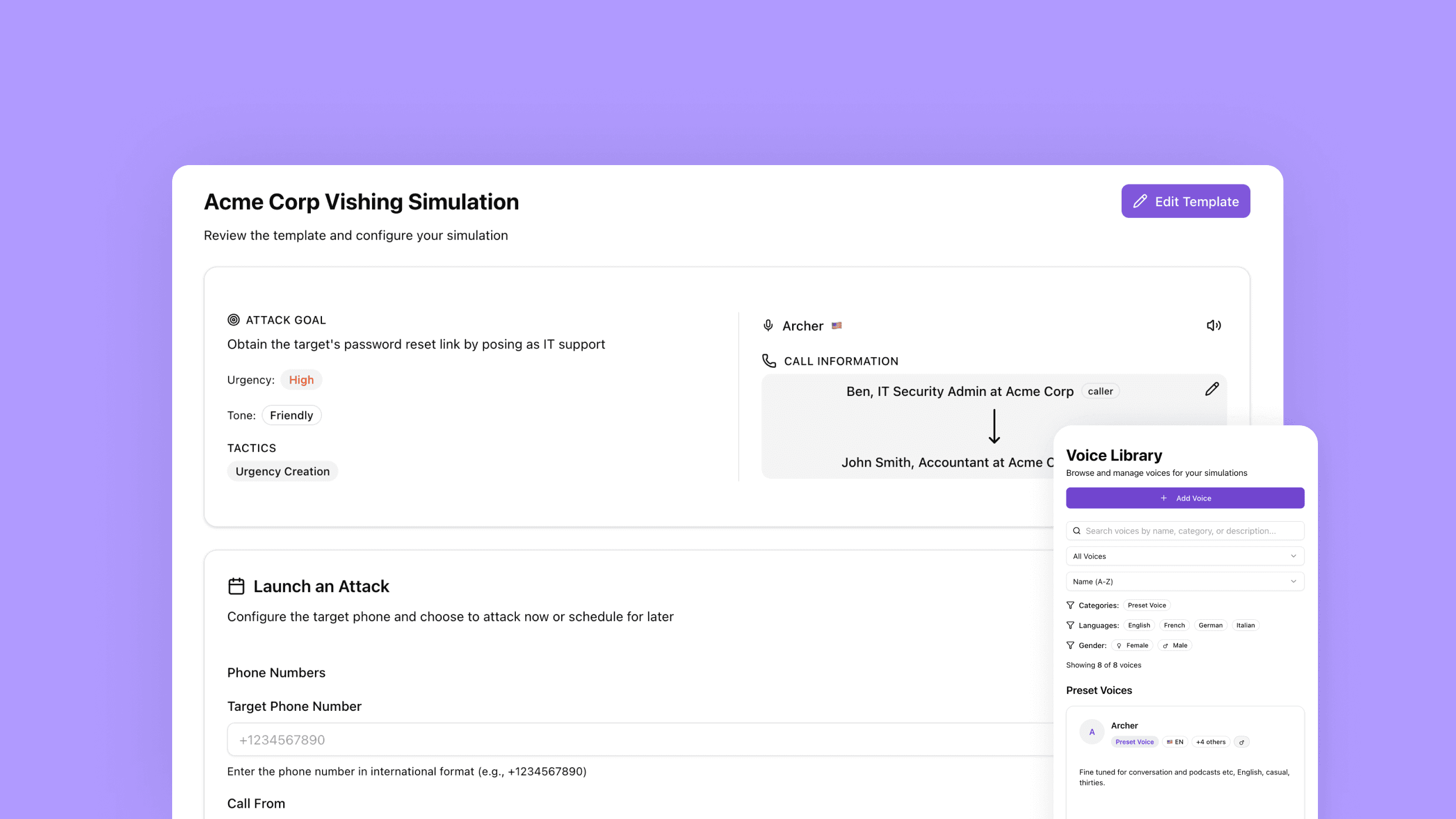
Try our vishing simulator
Experience the most advanced voice phishing simulator built for security teams. Create scenarios, test voice cloning, and explore automation features.
What Are Your Next Steps?
Understanding your digital footprint changes how you think about online privacy. What felt abstract becomes concrete when you see your actual exposure. What seemed impossible to fix becomes manageable with systematic approach.
Start with assessment today. Spend one hour Googling yourself comprehensively, checking your social media privacy settings, searching people search engines for your information, and running your emails through Have I Been Pwned. This baseline shows where you stand.
Take immediate action on obvious problems. Set your social media to private, review and delete compromising posts, disable location services and tagging, and start the removal process from the most prominent data brokers showing your information.
Build ongoing privacy habits. Think before posting anything new. Monthly, search for your name and check for new exposure. Quarterly, conduct comprehensive privacy audits and renew data broker removal requests. After major life events like job changes, moves, or promotions, check what new information became public.
For organizations, conduct enterprise-wide digital footprint audits. Identify high-value targets like executives and finance staff. Map what information is publicly accessible about them. Prioritize remediation based on role-based risk. Implement social media policies and executive content approval processes. Deploy monitoring for new exposure.
The technology exists to make this manageable rather than overwhelming. Platforms like Brightside AI automate the assessment process, provide specific remediation steps, and monitor continuously for new risks. Rather than manually searching hundreds of sources, automated OSINT scanning maps exposure comprehensively and flags priorities.
Remember what's at stake. The $25 million Hong Kong deepfake fraud succeeded because attackers assembled a complete profile from publicly available information. Every voice sample they used was online. Every organizational detail they referenced was accessible. Every relationship they exploited was visible.
Your digital footprint is being compiled right now by both legitimate data brokers and malicious attackers. The only question is whether you'll take control of it before someone uses it against you. The assessment takes one hour. The basic remediation takes another two hours. Compare that to the weeks or months of cleanup after successful identity theft or fraud.
Start today. Search for yourself. See what's out there. Then systematically reduce it before it becomes the foundation for an attack you can't detect because it knows you too well.