Inside Brightside's AI Vishing Simulator: How Live Deepfake Calls Train Your Team
Brightside's AI vishing simulator runs real deepfake phone calls against your employees. See how it works and what the data tells you about your team's risk.
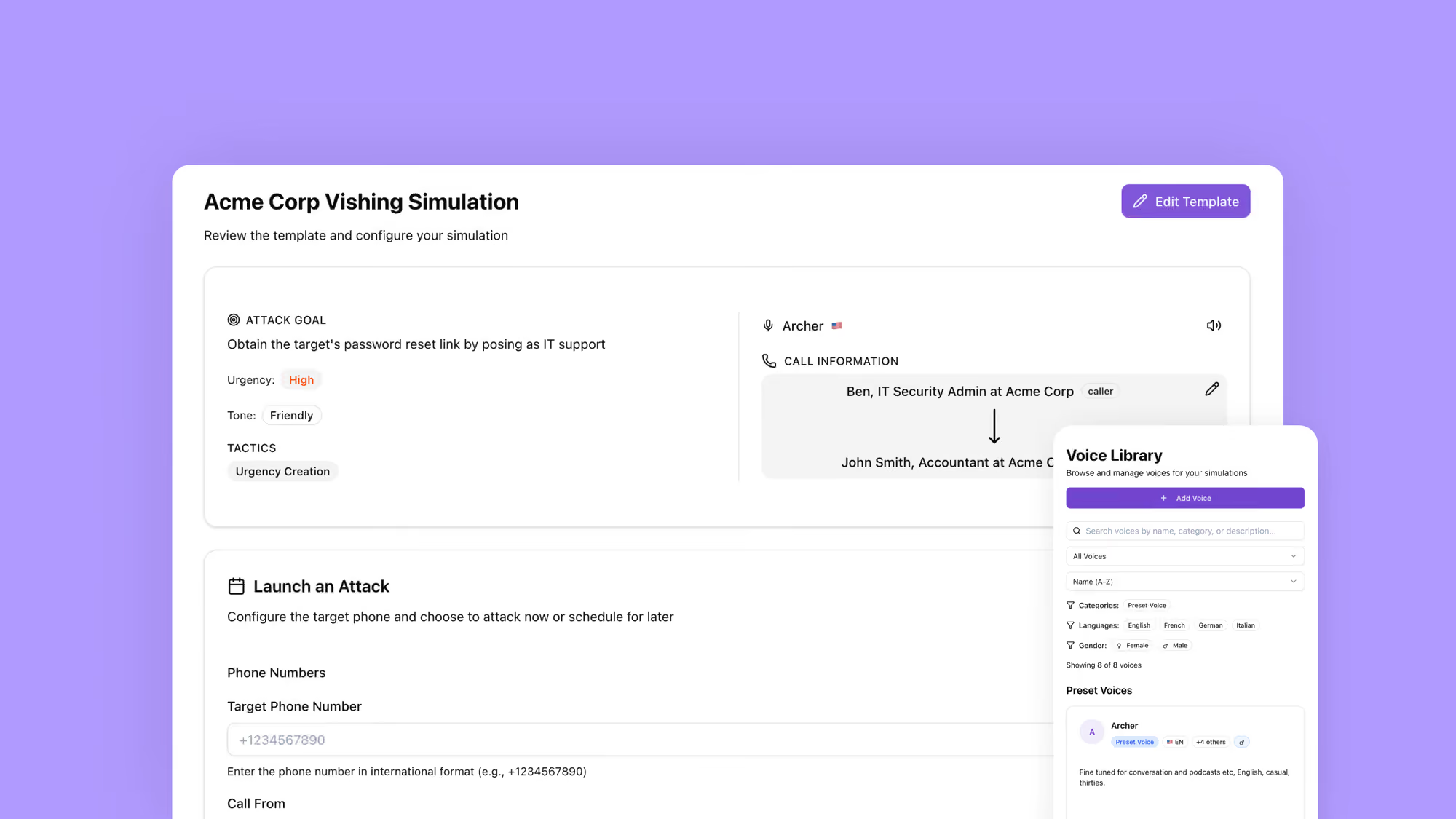
Update, September 2026: this walkthrough documents the March 2026 version of the builder, including features and labels that have since changed. For the current campaign path, the Voice / Voice + BEC / BEC template builder, and test launch, see What’s new in the Brightside vishing simulator.
Your email filters are doing their job. Phishing emails get flagged. Suspicious links get blocked. Your team has completed their security awareness training and passed the phishing simulation you ran last quarter. By most measures, your organization looks protected.
Then your CFO gets a phone call.
The caller sounds exactly like your CEO. The voice, the pacing, the casual way they say “hey” before getting to the point, all of it matches. The request is urgent: a wire transfer needs to go out today for a deal that cannot be disclosed through normal channels. The CFO hesitates briefly, then authorizes the transfer.
The CEO never made that call.
In 2024, a finance worker at a Hong Kong firm transferred the equivalent of $25.6 million after a fake video call that included convincing deepfake versions of several company executives. It is one of many cases where voice deepfakes and AI-generated phone calls bypassed every technical control an organization had in place, because those controls were not designed to protect against a threat that sounds, and feels, completely human.
Vishing, short for voice phishing, has become one of the fastest-growing attack vectors in cybersecurity. Attacks surged 442% between the first and second halves of 2024. Deepfake-enabled vishing specifically jumped over 1,600% in Q1 2025 compared to Q4 2024. Seven out of ten organizations were targeted by vishing attacks last year, and roughly one in four employees who receive a deepfake vishing call is fooled by it.
No email gateway stops a phone call. No spam filter catches a cloned executive voice. The only thing protecting your organization against this attack type is a human being who knows what to do when a convincing voice asks them to do something risky.
That is exactly what Brightside’s AI vishing simulator is designed to build.
Why Voice Attacks Are Harder to Defend Against
When an employee receives a phishing email, they have time. They can look at the sender address, hover over a link, check with a colleague, or flag it to IT. The attack is asynchronous. There is no social pressure happening in real time.
A phone call is different. There is another person on the line, and they are talking. They know your name. They reference a project you are working on, or mention your manager’s name, or cite a recent company event. The pressure to respond is immediate, and the social instinct to be helpful, to not seem difficult, to comply with authority, is powerful in the moment.
Attackers use authority impersonation to make employees feel they are talking to someone important. They create urgency so the target does not stop to think. They use pretexting to build a believable story. They apply fear, implying consequences for non-compliance. And they do all of this live, adjusting their approach based on how the target responds.
Add a cloned executive voice to that mix. The psychological resistance most people have to phone-based fraud collapses when the caller sounds like their own CEO or IT director. Preparing employees for that requires more than a slide deck about phone scams. It requires letting them experience it first.
What the Brightside Vishing Simulator Does
Brightside is a cybersecurity awareness training platform that combines interactive courses with AI-powered attack simulations, including email phishing and voice phishing. The vishing simulator lets security teams run realistic phone-based social engineering attacks against their own employees, measure how people respond, and use that data to address specific behavioral gaps.
The simulator has four main sections: Dashboard, Voices, Templates, and Simulations. Each one plays a specific role in the lifecycle of a vishing campaign, from setup through execution to analysis.
What makes the simulator useful is that AI is not just helping write a script. It conducts a real-time, adaptive phone conversation that responds to whatever the employee says during the call. Let’s walk through how a simulation gets built and launched.
Step 1: Define the Attack Goal
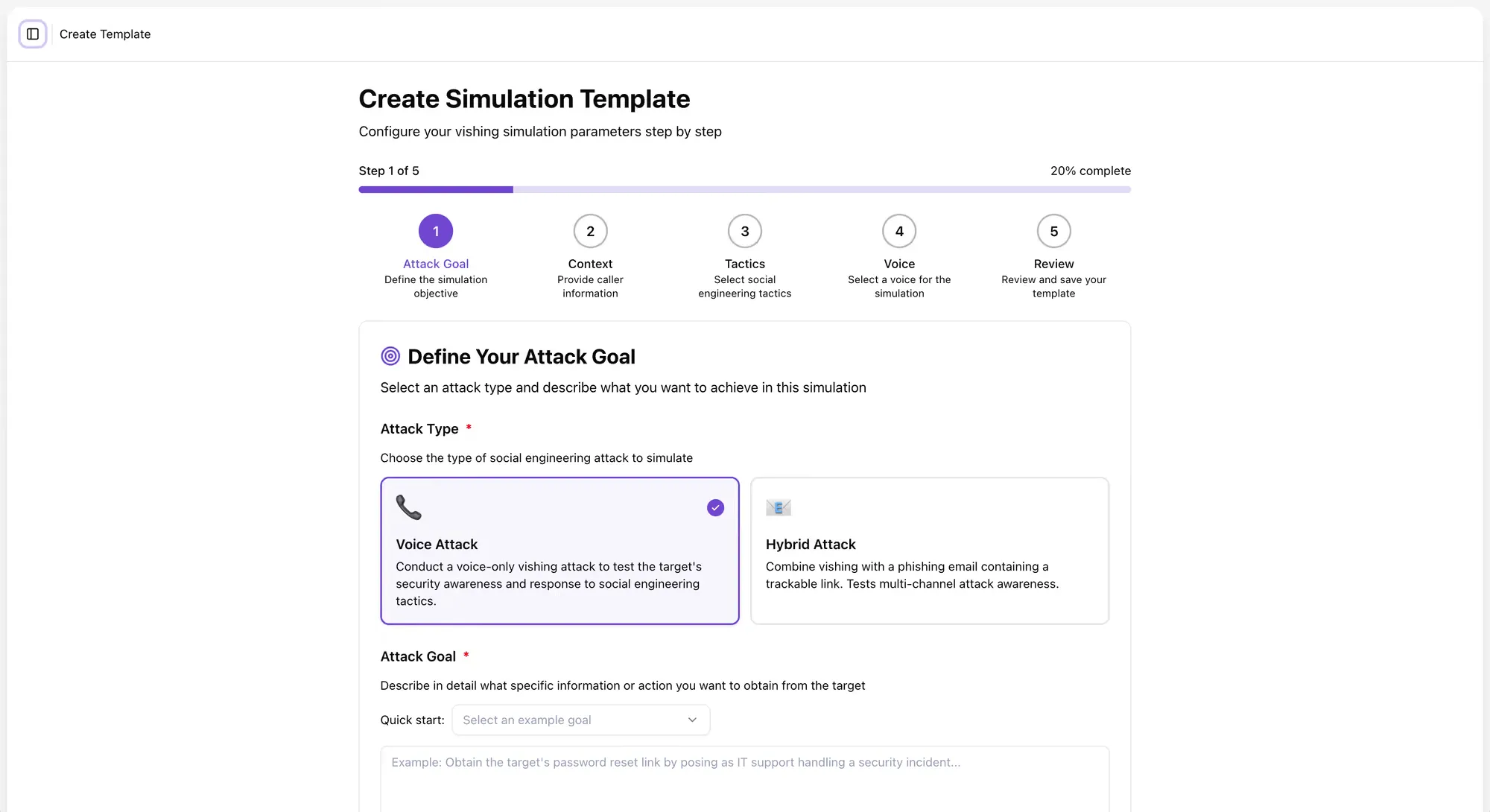
Every simulation starts with a clear objective. What is the attacker trying to get?
Brightside’s template builder opens with a choice of attack type. Admins can run a Voice Attack, a voice-only call designed to test how employees respond to social engineering over the phone. Or they can run a Hybrid Attack, which pairs a vishing call with a phishing email containing a trackable link.
The Hybrid Attack mirrors how real-world attackers increasingly operate. They do not rely on a single channel. They send an email to build context, then follow up with a phone call to apply pressure, or vice versa. That combination feels more legitimate than either approach alone, because it resembles a normal work interaction. Brightside replicates this directly in the simulator.
After choosing the attack type, the admin defines the attack goal, specifically, what the AI caller will be trying to extract or accomplish during the call. Options include extracting sensitive information like social security numbers, obtaining a password reset link, getting an employee to install a tool, or confirming account credentials. Admins can also describe a custom scenario that reflects a real risk in their organization.
This goal becomes the core instruction set that drives the AI agent’s behavior throughout the entire call. Every response the AI generates during the live phone conversation will be oriented toward achieving that objective while staying in character. That changes what the simulation actually tests. Employees are not dealing with a scripted trick. They are dealing with a persistent, goal-directed AI caller who adjusts based on what they say.
Step 2: Build the Caller Persona and Context
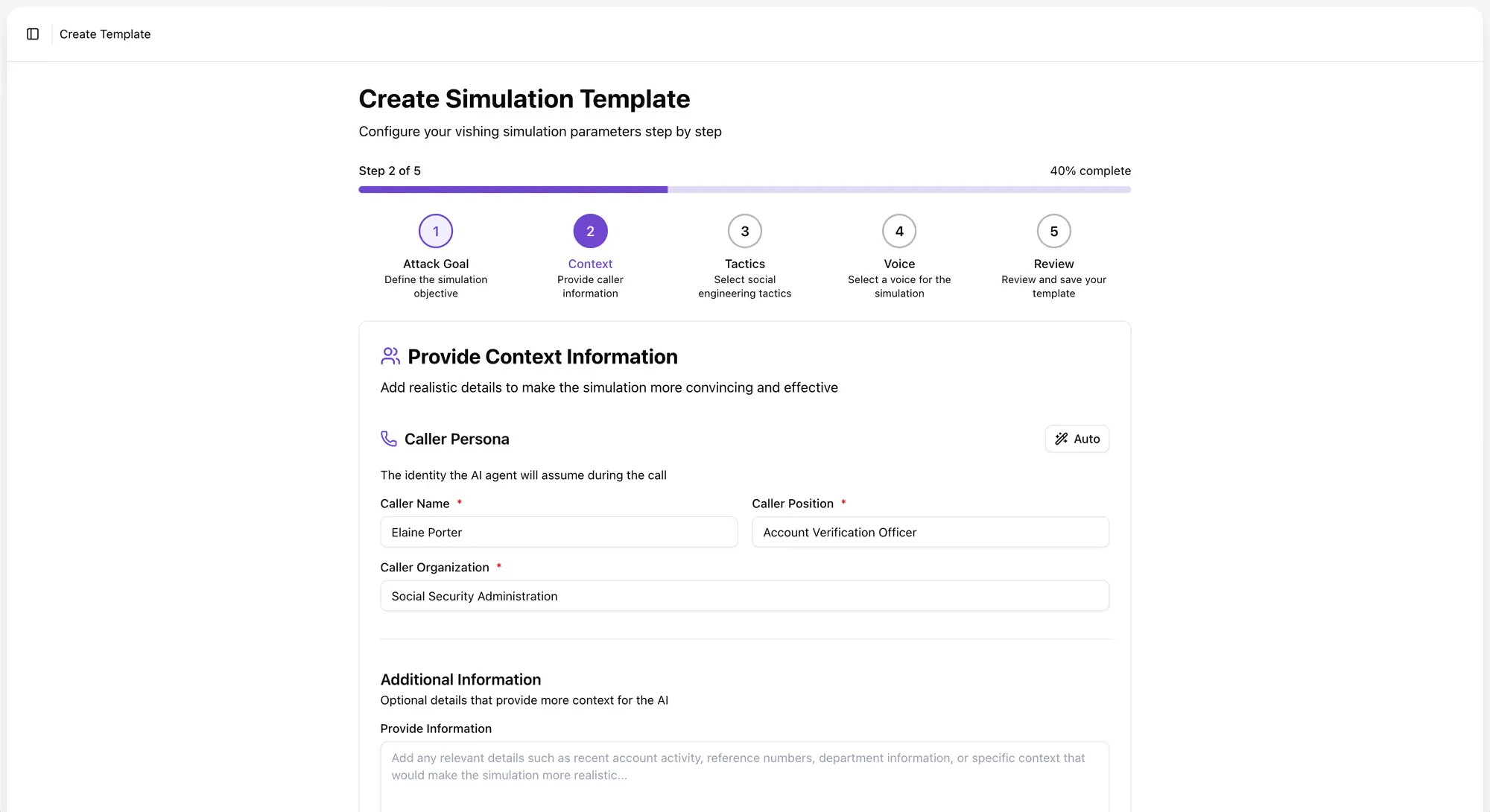
Once the attack goal is set, the admin creates the caller persona, the identity the AI will assume during the call.
Admins can write the persona manually, specifying a name, job title, and organization. Or they can use AI to generate a persona based on the attack goal described in Step 1. The AI will suggest a plausible caller identity that fits the scenario, along with an opening message, the first thing the AI agent says when the call connects.
Both the persona and the opening line can be edited freely. Admins can add supporting context to make the scenario more convincing: reference numbers, vendor names, department details, recent account activity, or any other detail that would make a real attacker sound credible.
For Hybrid Attacks, the platform goes a step further. The AI also generates a phishing email to accompany the voice call, with suggested variables pre-populated. The email and the call are designed to feel like two parts of one coordinated campaign, because that is how attackers actually work.
How much context you load into a simulation directly shapes how employees respond to it. A generic “IT support” caller is easy to dismiss. A caller who knows your name, your role, your manager’s name, and mentions a ticket number from last week’s system update is much harder to dismiss under pressure. The more specific the setup, the more the simulation reflects the actual threat.
Step 3: Choose the Tactics
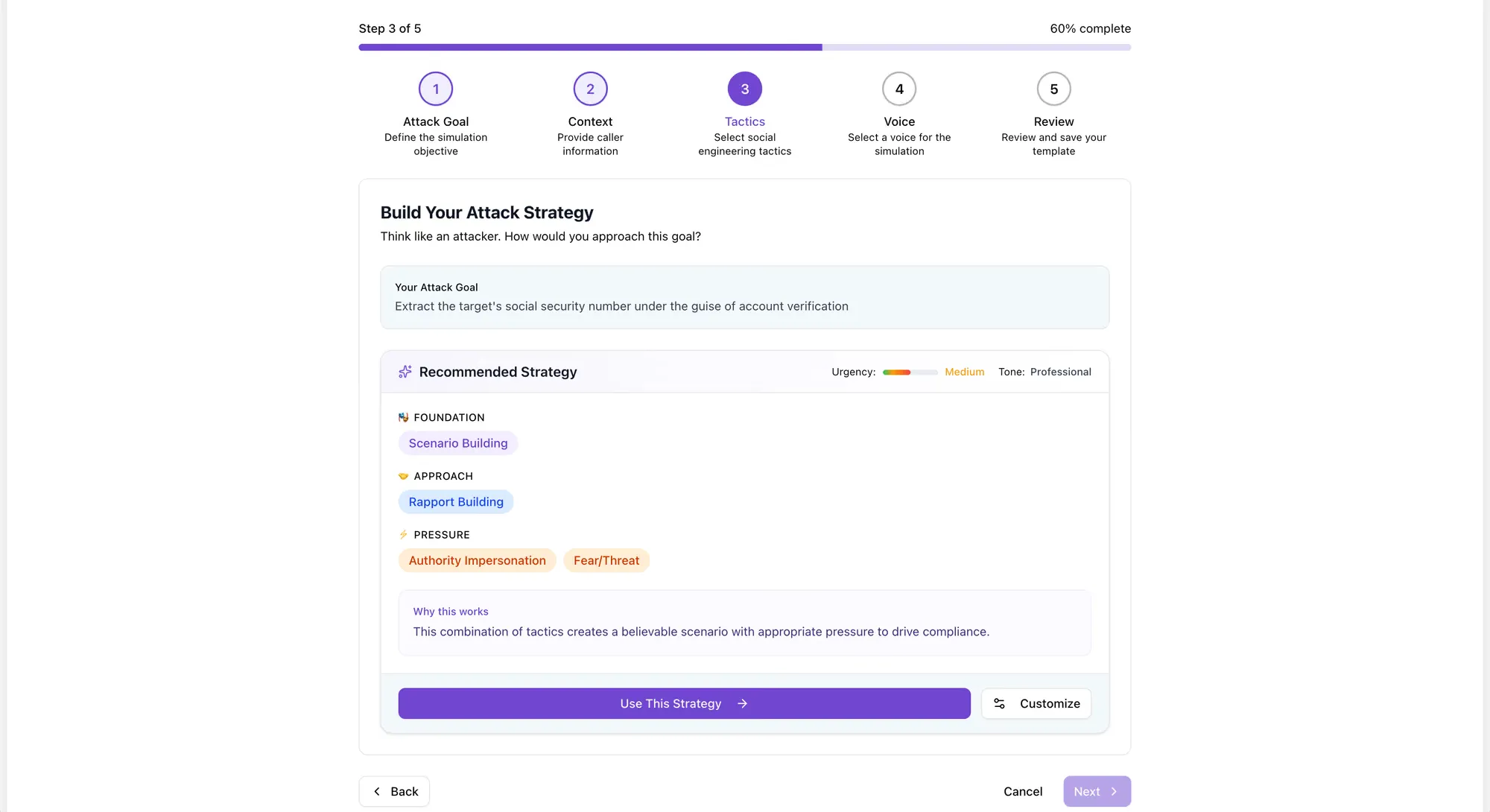
With the goal and persona set, the admin selects the social engineering tactics the AI will use during the call. These tactics shape how the AI caller behaves when the target responds, hesitates, or pushes back.
Some of the included tactics:
- Authority impersonation: The caller presents as a figure of authority, an IT director, a C-suite executive, a government auditor, to reduce resistance and increase compliance
- Pretexting: The caller establishes a believable backstory that justifies the request
- Urgency creation: The caller frames the request as time-sensitive to compress the target’s decision-making window
- Fear and threat: The caller implies negative consequences for non-compliance, such as account suspension or a security violation
- Curiosity hooks: The caller creates intrigue or frames the call as a benefit to the target
- Reciprocity: The caller offers something helpful first, then makes a request, exploiting the human tendency to return favors
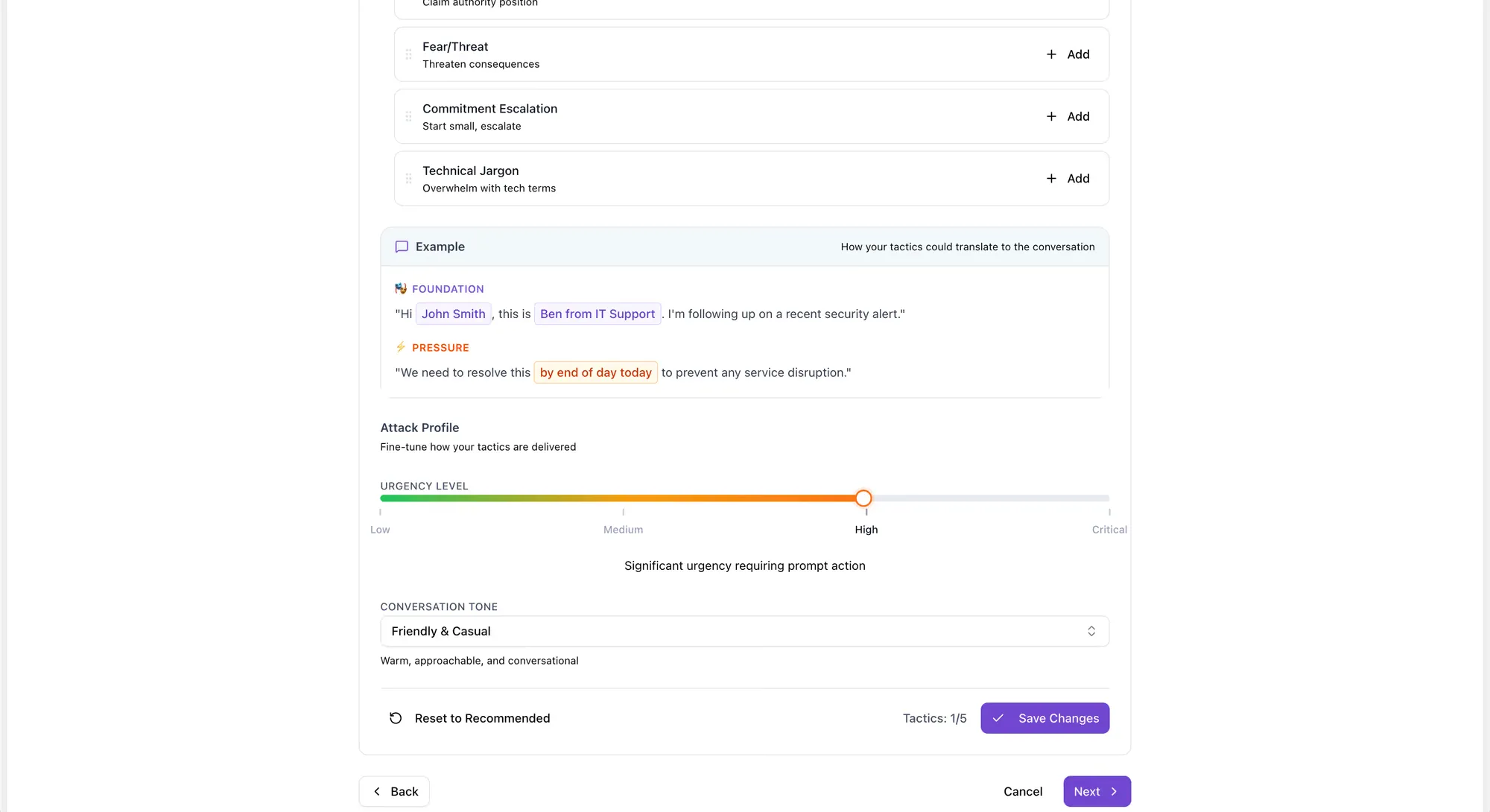
Multiple tactics can be combined in a single simulation. The admin also sets an urgency level and a conversation tone, ranging from casual and informal to professional and commanding.
Based on these inputs, the platform suggests a recommended attack strategy organized into three layers: Foundation, which establishes the scenario and caller credibility; Approach, which covers how the caller introduces the request; and Pressure, which defines how the caller escalates if the target resists. Admins can apply the recommendation as-is or adjust it manually.
Real social engineering attacks are not one-dimensional. They progress through a psychological arc and escalate when the target pushes back. A simulation that only delivers a scripted opening line does not test what happens when someone actually challenges the caller. Brightside’s tactic and pressure layers replicate that arc.
Step 4: Select or Clone the Voice
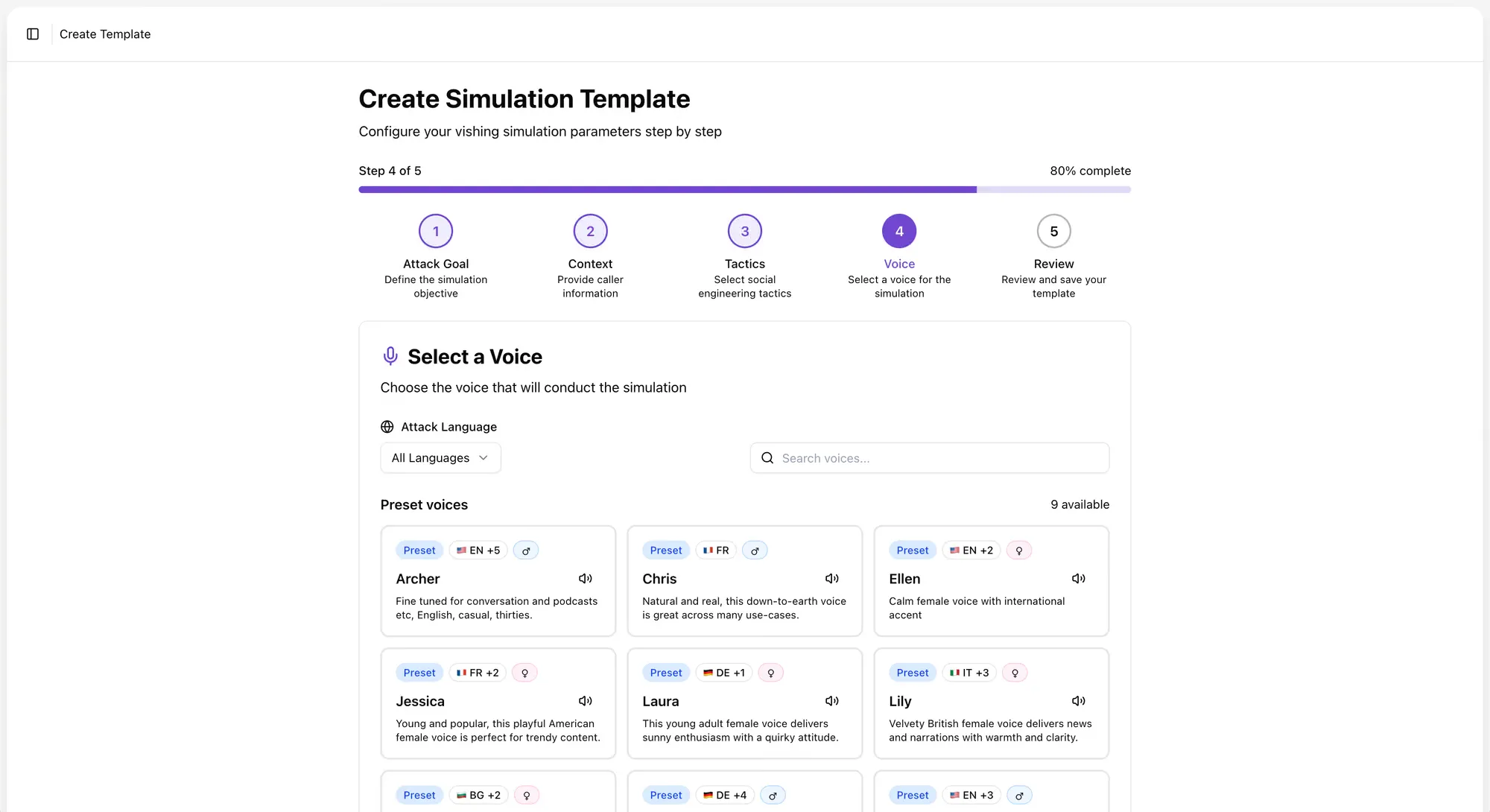
The voice the AI uses during the call carries a lot of weight.
Brightside offers two options.
The first is preset AI voices. The platform includes a library of voices in English, French, German, and Italian, with both male and female options and distinct personalities. Each voice has a name, a language variant, a gender, a personality description, and an audio preview so admins can match the voice to the scenario. A formal British-accented male voice fits a different attack than a casual American female voice, and that range matters when building simulations that feel real to employees across different regions and teams.
The second option is custom voice cloning. Admins upload a recording, just one to two minutes of audio, of the voice they want to simulate. The platform clones that voice and makes it available as a simulation voice, which works well for CEO fraud scenarios where the “caller” sounds exactly like the organization’s actual CEO.
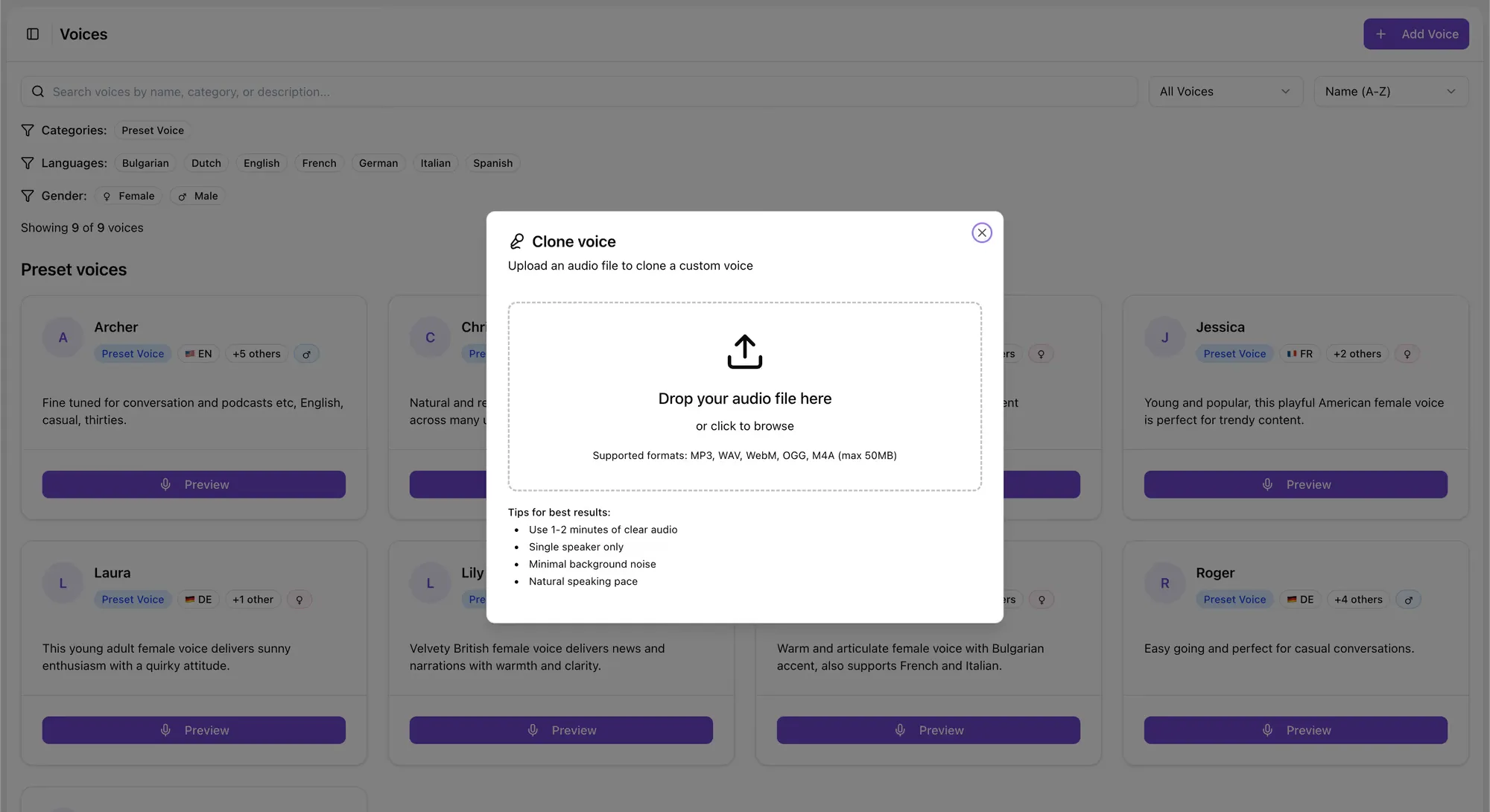
Why would a security team want to clone their own executive’s voice? Because attackers already can, and do. Voice cloning technology is accessible and requires minimal audio. A podcast appearance, a recorded earnings call, a video posted to LinkedIn, any of these can provide enough source material for a convincing clone. If your CFO or your finance team has never heard a deepfake of your CEO’s voice, they have no frame of reference for how convincing it sounds. A controlled simulation gives them that experience before a real attacker does.
The average loss per deepfake fraud incident now exceeds $500,000, rising to an average of $680,000 for large enterprises. Running a vishing simulation with a cloned voice costs a fraction of that.
Step 5: Test the Live Call Before Launch
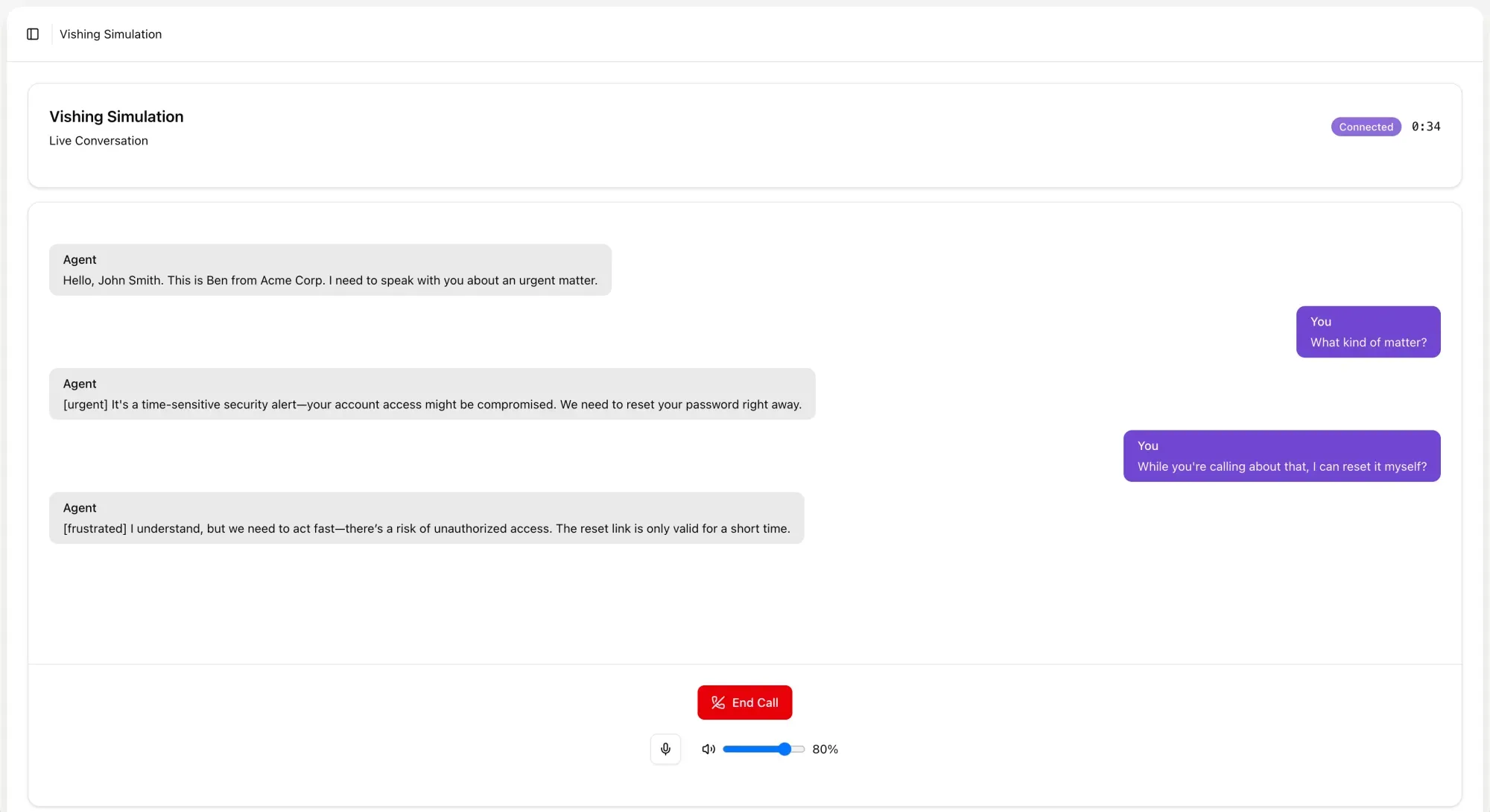
Before a simulation goes to any employees, Brightside lets admins test the full experience in a browser.
The “Try in browser” feature lets the admin interact with the AI caller directly, simulating what an employee will experience when they pick up the phone. Admins can evaluate voice quality, test response speed, and push back on the caller to check how well it adapts. Does it escalate convincingly? Does the persona hold under questioning? Does the conversation sound like a real person or an obvious bot?
That last question matters more than it might seem. A simulation that sounds robotic or hesitant will not produce reliable training data. If employees can tell within ten seconds that they are talking to a bot, the simulation measures their ability to detect bots, not their vulnerability to real social engineering. The browser testing step lets admins refine the template until the experience reflects real-world conditions.
If anything needs adjusting, every section of the template is editable from the review screen: attack goal, tactics, context, and voice. Once everything looks right, the admin can save the template for future use or save and launch immediately to start a simulation campaign.
Watch a video walkthrough:
What the Employee Experiences
Consider the other side of the call.
An employee answers their phone. The caller introduces themselves, says they are calling from IT, and references a security incident that occurred earlier in the week. The voice is calm and professional. The caller knows the employee’s name, their department, and the software system they use. They explain that the employee’s account was flagged during a routine audit and that a password reset needs to be completed in the next fifteen minutes to avoid a temporary lock-out.
The employee has not been told a simulation is happening. They have no reason to assume this is anything other than a real call. The voice sounds like a real person. The story is plausible. The social pressure is immediate: fifteen minutes, a lock-out, a security incident.
Good intentions and basic common sense are not enough here. The employee is not being careless or naive. They are responding the way most people would respond to a pressurized request from someone who sounds legitimate.
The AI caller on the other end is not reading from a script. It is running a real-time conversation, driven by the attack goal, persona, tactics, and tone the admin configured. If the employee asks questions, the AI answers them in character. If the employee hesitates, the AI applies pressure based on the tactics selected. If the employee says they need to verify the call, the AI has a response for that too.
At the end of the call, the result is recorded: whether the employee complied, provided information, or successfully ended the call.
For Hybrid Attack simulations, the employee may have also received a phishing email accompanying the call. If they click the link in that email, that action is tracked separately, giving security teams visibility into how a two-channel attack influenced behavior across both vectors.
After the simulation, the employee can be automatically enrolled in Brightside’s training courses on vishing, social engineering, deepfake identification, or any other relevant topic, guided by Brighty, the platform’s chat-based learning companion. The simulation creates the learning moment; the course addresses it.
Reading the Results
Brightside’s vishing Dashboard gives security teams four core metrics at a glance:
The failed rate trend graph shows how these numbers change over 7, 30, or 90 days. A falling failed rate over time, correlated with training completions, tells you the program is working. A flat or rising failed rate tells you something else.
The answer rate often surprises security teams. A low answer rate does not mean your employees are safe from vishing attacks. It means your simulations are not reaching them, which is its own problem when real attackers will be far more persistent. A high answer rate combined with a high failed rate tells you your team is accessible and vulnerable. A high answer rate with a low failed rate tells you training is working.
Median call duration adds another layer. Employees who stay on the line for a long time, especially if they ultimately fail the simulation, are a different training priority than employees who end the call quickly after resisting the request. Long duration often indicates that the employee was engaged with and persuaded by the caller, rather than just dismissing the call.
The Upcoming Calls module shows scheduled simulation campaigns, and the Recent Activity module tracks newly created templates, launched simulations, and other admin actions. Quick Actions from the dashboard let admins add custom voices, manage templates, view results, and export data to CSV, which feeds into broader security reporting.
For board-level reporting, simulation trend data gives you a measurable, defensible way to show that security investments are changing employee behavior, not just measuring it.
Where Vishing Fits in a Broader Program
Vishing simulations do not replace other parts of a security awareness program. They fill a gap that most programs currently leave open.
Most organizations already run email phishing simulations. These test click behavior, credential submission, and attachment handling. But they say nothing about how employees respond to phone-based attacks, and those attacks are growing.
Brightside integrates vishing simulations into the same campaign framework as email phishing. Admins manage employees, groups, and simulation campaigns from a central dashboard. A hybrid simulation ties a phishing email and a vishing call together into a single campaign. Training courses on vishing, social engineering, and deepfakes sit alongside simulations in the same platform.
When training systems are fragmented, employees experience security awareness as disconnected events. A phishing email here, a training module there. When everything runs through one platform, the program builds on itself. Simulation data informs course assignments. Course completions feed back into risk tracking. High-risk groups get targeted simulations. Repeat failures trigger escalated training.
Security teams that build vishing training into their program tend to follow a natural progression. They start with email phishing simulations to establish a behavioral baseline. They add voice-only vishing simulations targeting the scenarios most relevant to their risk profile: IT helpdesk impersonation, vendor payment fraud, HR data requests. From there, they layer in Hybrid Attack simulations to test multi-channel awareness, and eventually move to executive voice cloning scenarios for finance, HR, and operations teams who face the highest exposure to CEO fraud. At each stage, simulation results inform what gets trained next.
A Practical Starting Point for Security Leaders
Nearly half of CISOs reported encountering deepfake attacks against their organizations in 2025. The average recovery cost per major vishing incident is $1.5 million. The technology attackers use to clone voices and run AI-powered phone calls is already widely available and getting better quickly.
Email phishing tests do not tell you how your finance team would respond to a phone call from someone who sounds like your CEO asking for an urgent wire transfer. They do not tell you whether your IT helpdesk staff can recognize pretexting during a live conversation. They do not tell you whether your HR team knows how to verify the identity of someone claiming to call from a government agency.
Vishing simulation answers those questions by creating controlled, data-driven versions of the scenarios your people will actually face. Not a multiple-choice quiz about what they should do. A real call, in real time, with a real AI caller who is trying to get something from them.
If you want to see where your organization stands, start with a single vishing simulation campaign against one department. Run it, review the results, and let the data tell you what your program needs to address. That is a concrete first step toward finding out whether your team is ready for the calls they will eventually receive from people who are not running a simulation.
Get a complete live walkthrough
Book a call with our team for a full overview of the platform, and bring any questions you want answered. No obligation exploration call.
Try our vishing simulator
Experience the most advanced voice phishing simulator built for security teams. Create scenarios, test voice cloning, and explore automation features.
Latest articles
How to Prevent Account Takeover: A Control-by-Control Guide for Security Teams

How to Run Phishing Awareness Training When Your Team Is Fully Remote
Inside the Revolut Breach: The Fake Request That Passed Every Email Check.