How CEOs Can Stop Voice Phishing Before It Becomes a Breach
Voice phishing scams now target help desks, finance teams, executives, and SaaS access. Here is how CEOs can build practical defenses against vishing.

Companies stop voice phishing scams by making a phone call insufficient to authorize sensitive action.
Awareness helps, but it cannot carry the whole control burden. A finance manager should not be able to change vendor bank details because a caller sounded like the CFO. A help-desk analyst should not be able to remove MFA because a caller sounded like an employee in a rush. A customer support agent should not be able to release account data because the caller passed a few basic questions.
Voice phishing, or vishing, works because businesses still treat voice as a trust signal. A caller sounds confident. The number looks familiar. The request feels urgent. The person on the other end knows enough internal detail to sound legitimate.
AI voice cloning makes that trust problem sharper. The defense is still practical: assume a convincing voice can be fake, then design verification rules that normal employees can follow under pressure.
Voice phishing is now an identity and operations problem
Voice phishing scams are part of the enterprise attack path. Attackers use calls to reach help desks, finance teams, HR, payroll, legal teams, executive assistants, customer support, and employees with SaaS access.
A call can lead to an MFA reset, an OAuth approval, a remote support session, a vendor payment change, a file export, or access to Salesforce, Microsoft 365, Google Workspace, Okta, Slack, Zendesk, or another business-critical system.
The financial context is already serious. The FBI Internet Crime Complaint Center reported more than $20 billion in cybercrime losses in 2025, with Business Email Compromise accounting for more than $3 billion in reported losses. Voice phishing is a separate tactic, but the categories overlap when attackers combine calls, texts, and emails to impersonate executives, vendors, or internal teams.
Threat intelligence shows how fast the damage can happen. Mandiant and Google Threat Intelligence Group reported a campaign against US legal, financial, and professional-services organizations where attackers used voice phishing to impersonate internal IT, guide victims into screen-sharing sessions, abuse remote management tools, and steal sensitive documents. In some cases, Mandiant observed data searches, staging, and theft begin in under an hour.
That speed puts voice phishing prevention on the CEO agenda. If a single call can produce valid access, the business has an operating-model problem, not a narrow training problem.
Decide which actions can never be approved by phone alone
The first control is a sensitive-action policy. Write down the actions that require verified approval through a trusted channel, regardless of who appears to be calling.
At minimum, phone-only authorization should be prohibited for:
- Wire transfers and high-value payments
- Vendor bank-detail changes
- Payroll account changes
- Password resets for privileged or sensitive roles
- MFA resets, MFA removals, and new authenticator enrollment
- New device enrollment
- OAuth app approvals and consent requests
- Remote monitoring and management tool installation
- Screen-sharing requests involving system administration
- Customer-data exports
- Legal, finance, HR, or board-document downloads
- Emergency requests from executives involving money, credentials, or secrecy
This policy has to be explicit. “Be careful” leaves too much room for pressure. Employees need to know which actions are blocked until a second verification step is complete.
The rule should protect employees as well as systems. If a caller says the CEO approved it, the employee should have permission to pause. Urgency should trigger verification, not bypass it.
Build a verified callback process people can actually use
Many companies tell employees to “verify the caller.” That advice is too vague to work during a real call.
A usable callback process has three parts:
- Use known contact points, not caller-provided numbers.
- Confirm the request through a separate approved channel.
- Log the verification before completing the action.
If a vendor calls to change bank details, finance should call back using the number already stored in the vendor master record or contract system. If an employee calls the help desk for an MFA reset, the help desk should verify through a pre-registered device, manager approval workflow, or identity proofing process. If an executive asks for an urgent transfer, finance should confirm through a known internal channel instead of replying inside the same call or message thread.
Shared secrets are weak evidence. Employee ID, date of birth, manager name, office location, customer name, ticket number, and last invoice amount may be available through LinkedIn, breached data, old emails, or internal documents.
Exception handling matters too. Attackers exploit the gap between written policy and real behavior. If the CEO, CFO, or general counsel can override the process informally, the process will fail when it is tested.
Lock down the help desk before attackers call it
The help desk is one of the most valuable voice phishing targets in the company. A successful reset can turn a phone call into valid access.
Scattered Spider-style attacks show the risk. Attackers perform reconnaissance, impersonate employees or contractors, create urgency, and pressure support staff to reset credentials or remove MFA protections. Once inside, they can escalate privileges, steal data, or enable ransomware activity.
CEOs do not need to manage help-desk controls personally. They do need to make them non-negotiable. The CIO and CISO should be able to show:
- Which roles are considered high risk
- Which reset requests require manager approval
- Which requests require identity proofing beyond voice
- Whether help-desk agents can remove MFA
- Whether privileged users have stricter reset rules
- Whether reset activity is logged and reviewed
- Whether spikes in resets, MFA removals, or new device enrollments trigger alerts
For high-risk accounts, normal support calls should not be enough to reset access. Executives, administrators, finance approvers, HR and payroll users, legal users, developers, and customer-data administrators should sit behind stricter verification.
The strongest help-desk control is cultural as much as technical. Support teams must know leadership will back them when they slow down a suspicious request.
Protect finance, payroll, and vendor workflows from voice pressure
Voice phishing often succeeds because finance and operations teams are trained to be responsive. Attackers exploit that habit.
The practical fix is to remove emergency discretion from high-risk financial workflows. A payment or vendor change should require the same verification process even if the caller sounds senior, angry, friendly, or time-sensitive.
Useful safeguards include:
- Dual approval for high-value payments
- Independent confirmation for new vendor bank details
- Callback to a known vendor contact before payment changes
- Hold periods for changed payment instructions
- Segregation between the person creating a vendor change and the person approving it
- Review of urgent executive requests outside the original communication channel
- Fast escalation to the bank and IC3 when fraud is suspected
Payroll needs similar rules. Attackers may call or message HR to change direct deposit details, request employee records, or create urgency around a supposed benefits issue. Treat payroll changes like money movement, because that is what they are.
Make identity controls phishing-resistant
MFA is necessary, but it is not the finish line.
Voice phishing can turn weak MFA into a process the attacker walks the employee through. A caller posing as IT can ask for a one-time code, trigger repeated prompts, ask the employee to approve a login, or guide them into authorizing a malicious app.
Companies should move high-risk roles toward phishing-resistant MFA such as passkeys or FIDO2 hardware-backed authentication where practical. The reset path deserves the same attention. A strong authenticator is weakened if the help desk can remove it after a convincing call.
Security teams should monitor for identity and SaaS signals that commonly follow vishing:
- New device registrations
- New MFA factors
- Suspicious OAuth grants
- Login attempts from unusual locations or devices
- Impossible travel
- Privilege changes
- Bulk exports from CRM, document management, or file-sharing systems
- Unusual remote support or screen-sharing activity
In Salesforce-focused data theft campaigns, reporting tied to Google Threat Intelligence described vishing attempts that tricked victims into handing over login details and MFA codes. The call creates the shortcut into trusted systems.
Do not trust voice, caller ID, or voice biometrics by themselves
Voice feels personal, which is exactly why it is dangerous.
Caller ID can be spoofed. Public audio from earnings calls, podcasts, webinars, interviews, and social media can give attackers material for voice cloning. A familiar cadence or accent is no longer enough to prove identity.
Research is moving quickly, but the direction is clear. A 2026 arXiv study on synthetic voices in vishing scenarios found that participants had poor accuracy distinguishing AI-generated voices from human-recorded voices in realistic scam clips. Another 2026 paper on audio-based biometric authentication found that voice cloning can challenge speaker verification systems and that anti-spoofing detectors may struggle to generalize to unseen synthesis methods.
Voice biometrics can still have value. In contact centers, voice can be one useful signal among many. It should be combined with device intelligence, network signals, behavioral analytics, liveness checks, transaction risk, and step-up authentication.
For high-risk business actions, the safest rule is simple: voice can start a conversation, but it cannot finish the approval.
Train the roles attackers actually target
Generic annual security training is too blunt for voice phishing prevention.
Train the roles attackers are most likely to call:
- Help desk and IT support
- Finance and accounts payable
- Payroll and HR operations
- Executive assistants
- Legal and compliance teams
- Sales and customer success teams with CRM access
- Contact-center agents
- Executives and board-facing staff
Each group needs role-specific practice. A help-desk analyst needs to rehearse MFA reset pressure. A finance manager needs to rehearse vendor bank-change fraud. An executive assistant needs to rehearse urgent calendar, document, and travel-related requests. A contact-center agent needs to rehearse callers who pass basic knowledge checks but fail risk-based authentication. For a deeper training-specific workflow, Brightside has a guide to training employees against AI voice scams.
The response should be concrete:
- Pause the action.
- Refuse to disclose codes, credentials, or sensitive data.
- Verify through the approved channel.
- Report the attempt.
- Document what happened.
Employees do not need paranoia. They need a script that is easier to follow than the attacker’s script.
Use voice phishing simulations to test the process
Voice phishing simulations are useful when they test whether the company process works.
A good simulation should answer operational questions:
- Did the employee recognize the request as sensitive?
- Did they refuse to share codes or perform the requested action?
- Did they use the approved callback or verification path?
- Did they report the call?
- Did the help desk, finance, or security team respond correctly?
- Did leadership support the delay?
Simulations should not be designed to embarrass employees. Punitive programs teach people to hide mistakes. Useful programs test controls, find process gaps, and trigger follow-up training.
AI voice and deepfake attack simulations also need governance. If a company clones an executive’s voice for a training exercise, it should define consent, who can access the voice asset, how long it is retained, how scenarios are approved, and how misuse is prevented.
Voice phishing simulation platforms to consider
Technology will not replace process, but the right platform can help a company practice realistic scenarios and measure whether employees follow the protocol. For a standard vishing-readiness program, CEOs and security leaders can evaluate these options.
Brightside
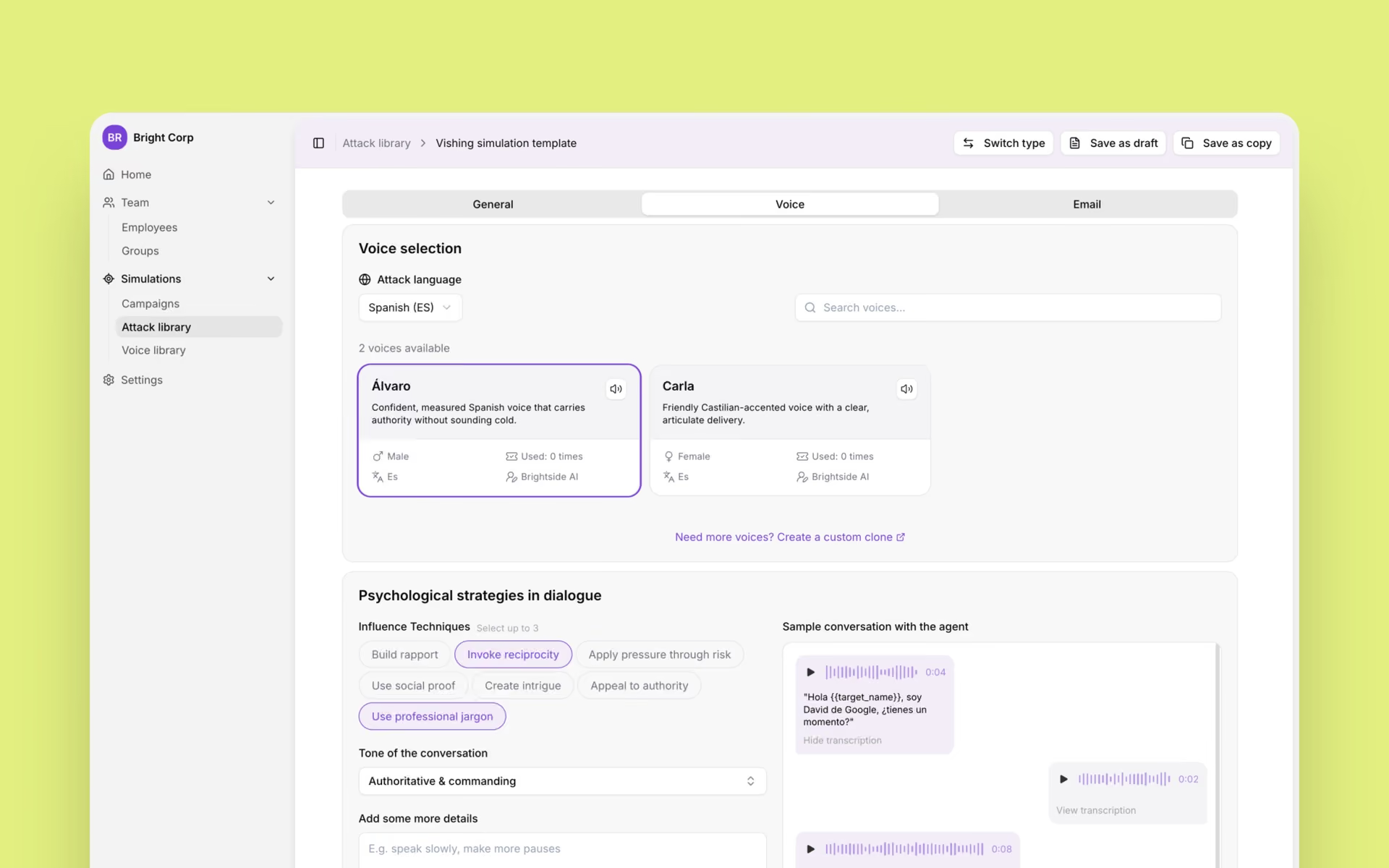
Brightside is positioned as an AI-era simulation platform covering phishing, vishing, and deepfake readiness. Its AI vishing simulator supports live AI-powered phone calls, voice-only and hybrid voice-plus-email scenarios, configurable caller personas, attack goals, target context, tactics, tone, preset voices, and custom voice cloning from a short recording. Admins can preview simulations before launch and track results such as failed rate, answer rate, median call duration, and total simulations.
Brightside is a strong fit for companies that want to rehearse modern voice phishing scams against high-risk roles, especially where live call realism and hybrid attacks matter. The governance point is important: custom executive voice cloning should be controlled, consent-based, and limited to approved simulations.
Pros
- Live AI-powered vishing simulations
- Hybrid voice-plus-email attack workflows
- Custom voice cloning for executive impersonation scenarios
- Vishing-specific metrics and follow-up training
Cons
- More specialized around simulation depth than broad human-risk-suite breadth
- Voice cloning programs require clear internal governance
Hoxhunt
Hoxhunt is an enterprise human-risk platform with strong awareness, adaptive phishing training, and security behavior workflows. It is relevant for organizations that want a broader human-risk program with phishing simulation and employee engagement at scale.
For buyers focused specifically on live AI vishing depth, public information should be reviewed carefully during evaluation. Hoxhunt may be a better fit when the broader awareness and behavior-change program is the primary buying criterion.
Pros
- Strong enterprise awareness and behavior-change positioning
- Adaptive training and employee engagement model
- Good fit for larger security programs
Cons
- Voice-specific capabilities may need deeper validation in procurement
- Less obviously specialized around live outbound vishing than dedicated simulation-first tools
Jericho Security
Jericho Security focuses on AI-driven, personalized security training and multi-channel phishing simulation. It is relevant for teams evaluating modern simulation approaches across email, voice, and other social-engineering channels.
Jericho may fit companies that want AI-personalized attack rehearsal and are comparing newer simulation-first vendors. Buyers should validate the exact vishing workflow, admin controls, and reporting model against their internal process requirements.
Pros
- AI-era simulation positioning
- Multi-channel social-engineering focus
- Relevant for personalized training programs
Cons
- Feature depth and workflow details should be checked against current public documentation
- May require comparison against broader awareness platforms if content scale is a priority
Keepnet Labs
Keepnet Labs offers a broad human-risk management platform spanning awareness, phishing simulation, reporting, and response-oriented workflows. It is relevant for companies that want a wider platform covering multiple attack channels and operational response.
Keepnet can be a practical option where teams want broad human-risk coverage. Companies prioritizing highly configurable live AI vishing should compare the exact call flow, voice cloning, hybrid scenario, and reporting capabilities during procurement.
Pros
- Broad human-risk management coverage
- Multi-channel simulation and response orientation
- Useful for teams wanting platform breadth
Cons
- May be broader than needed for teams seeking only vishing simulation
- Live AI call depth should be validated during evaluation
KnowBe4
KnowBe4 is one of the best-known security awareness platforms, with extensive content, phishing simulation, and mature enterprise adoption. It is relevant for organizations that want broad awareness training, large content libraries, and established administrative workflows.
KnowBe4 can be a strong fit for general awareness programs. If the main requirement is realistic AI voice phishing simulation, buyers should validate whether its available voice and callback phishing options match the scenarios their help desk, finance, and executive teams need to practice.
Pros
- Large awareness-training ecosystem
- Mature phishing simulation workflows
- Familiar option for enterprise security teams
Cons
- Voice-specific realism may vary by package and use case
- May be less differentiated for live AI vishing than simulation-specialist vendors
A 30-60-90 day plan for CEOs
The CEO does not need to own every control. The CEO does need to set the standard that voice is not enough.
First 30 days
Inventory the sensitive actions that can create financial loss, account takeover, data theft, or operational disruption. Assign owners across finance, IT, security, HR, legal, customer support, and operations.
Create or update the verified callback policy. Freeze unsafe help-desk practices such as MFA removal or privileged-user resets based only on a phone call. Communicate that employees will be supported when they delay suspicious urgent requests.
Next 60 days
Harden the workflows. Add dual approval and callback requirements for payments, vendor changes, payroll changes, and high-risk data exports. Move high-risk users toward phishing-resistant MFA where possible. Restrict who can reset MFA and enroll new devices.
Security should add monitoring for suspicious identity events, SaaS exports, new OAuth grants, reset spikes, and remote support tool abuse.
Next 90 days
Run role-specific voice phishing simulations. Start with help desk, finance, payroll, executive assistants, and employees with privileged SaaS access. Measure whether people follow the process, not whether they can guess that a voice is fake.
Run a tabletop exercise for a successful vishing event. Include the CEO, CFO, CIO, CISO, legal, communications, and the affected business owner. Practice the first hour: containment, banking escalation, access revocation, evidence preservation, employee communication, and customer or regulator notification decisions.
Voice phishing scams succeed when a company treats trust as a feeling. They fail when the company turns trust into a process.
Get a complete live walkthrough
Book a call with our team for a full overview of the platform, and bring any questions you want answered. No obligation exploration call.
Try our vishing simulator
Experience the most advanced voice phishing simulator built for security teams. Create scenarios, test voice cloning, and explore automation features.
Latest articles

Live Vishing Simulation vs Pre-Recorded Calls: What the Difference Actually Trains
The Help Desk Callback Verification Script: What to Say and When

AI Vishing Simulations: How to Run Voice Phishing Drills That Actually Change Behavior